
 18 minutes ago
2
Club.noww.in
The Python range function gives you a sequence of whole numbers. It starts at 0 by default, counts up by 1 and stops just before the number you pass.
print(list(range(4))) # [0, 1, 2, 3]In this tutorial, I’ll cover its syntax and five examples: start and stop, steps, counting down, looping by index and slicing a range. Every output came from Python 3.12.5 in Command Prompt.
Python range() Syntax
range(stop) range(start, stop, step=1)| start | No | 0 | First number in the sequence |
| stop | Yes | none | Ends before this number |
| step | No | 1 | Gap; negative counts down |
Return value: a range object, an immutable sequence of integers. It stores only start, stop and step, so a huge range uses little memory.
Note: all three arguments must be integers. You’ll use it most inside a Python for loop.
When to Use range() in Python
- Repeating code a set number of times
- Building numbered IDs, days or price tiers
- Looping over list positions when you need the index
- Counting down in timers and retries
New to loops? You’ll like for i in range() explained.
Example 1: Use range() with Stop and Start Values
Let me start with one and two arguments. Python prints a range lazily; list() shows every number:
print(range(5)) print(list(range(5))) print(list(range(1, 11))) for day in range(1, 3): print(f"Nov {day}, 2026")Output:
range(0, 5) [0, 1, 2, 3, 4] [1, 2, 3, 4, 5, 6, 7, 8, 9, 10] Nov 1, 2026 Nov 2, 2026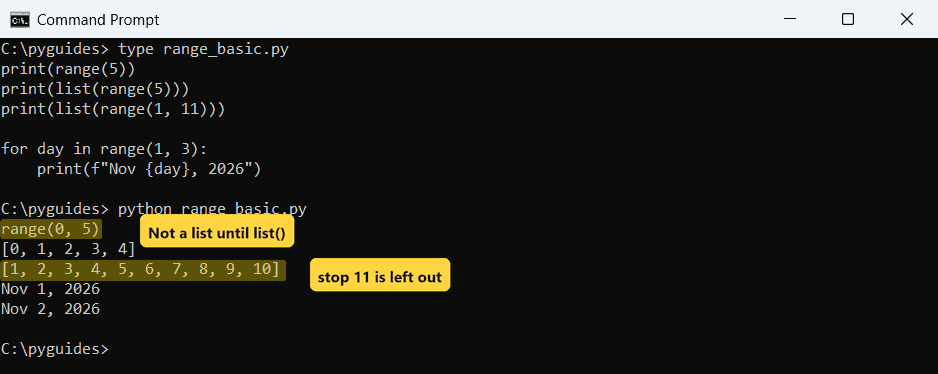 list() expands the range object.
How does this work? range(5) gave 0 to 4, and range(1, 11) gave 1 to 10. The stop value is never included.
Example 2: Count by 5s or 25s with the step Argument
The third argument sets the gap, like price tiers of 25 or even invoice numbers:
print(list(range(0, 101, 25))) print([f"INV-{n}" for n in range(1040, 1051, 2)])Output:
[0, 25, 50, 75, 100] ['INV-1040', 'INV-1042', 'INV-1044', 'INV-1046', 'INV-1048', 'INV-1050']How does this work? the range moves by step until it reaches stop. 100 is included because stop is 101.
Pro Tip: the second line is a Python list comprehension over a range.
Example 3: How Do You Count Down with range() in Python?
A negative step makes Python count backward. Put the bigger number first:
for sec in range(5, 0, -1): print(sec, end=" ") print("Liftoff!") print(list(range(1, 5, -1)))Output:
5 4 3 2 1 Liftoff! []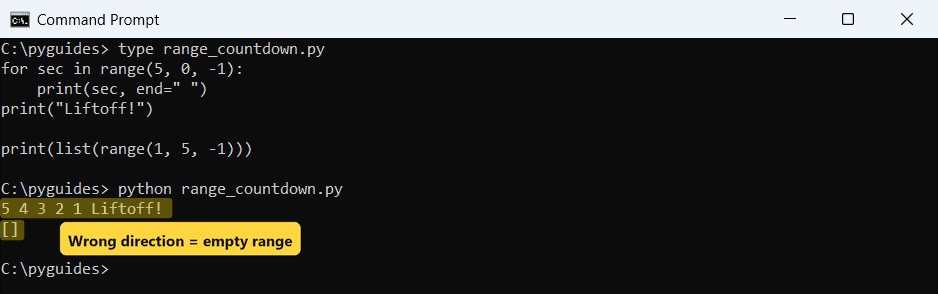 A countdown, then an empty range from the wrong direction.
How does this work? range(5, 0, -1) stops before 0. range(1, 5, -1) is empty: 1 can’t count down to 5. See reversing a range in Python.
Example 4: Loop Over a List by Index with range(len())
Need the position too? Combine range with len() on two matching lists of store sales:
cities = ["Austin", "Denver", "Seattle"] sales = [1249.50, 980.25, 1575.00] for i in range(len(cities)): print(f"{i + 1}. {cities[i]}: ${sales[i]:,.2f}")Output:
1. Austin: $1,249.50 2. Denver: $980.25 3. Seattle: $1,575.00How does this work? len() returned 3, so i took 0, 1 and 2. Usually, enumerate() in Python is cleaner.
Example 5: Index, Slice and Check a range Object
A range acts like a read-only Python list. You can index it, slice it and test membership:
r = range(0, 20, 2) print(len(r), r[3], r[-1]) print(10 in r, 11 in r) print(r.index(10), r[:5]) print(range(0, 3, 2) == range(0, 4, 2))Output:
10 6 18 True False 5 range(0, 10, 2) True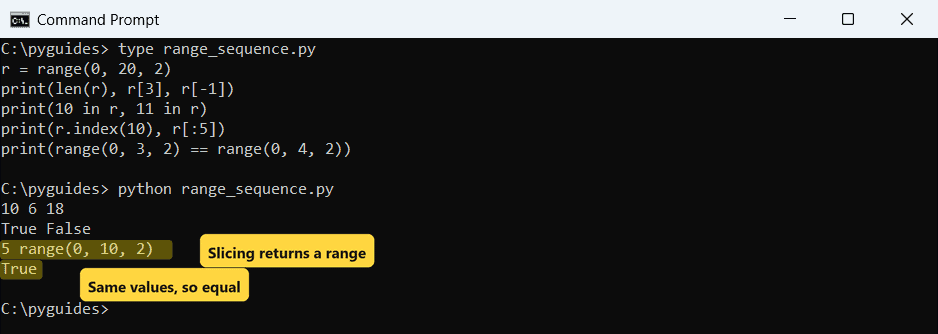 No list was built for any of these.
How does this work? slicing returned another range. The last line is True because both hold 0 and 2. It works like slicing lists in Python.
Common Mistakes with Python range()
These Python range errors trip up most beginners:
try: range(0.5) except TypeError as err: print("1. TypeError:", err) try: range(1, 10, 0) except ValueError as err: print("2. ValueError:", err) try: range(3) + range(3) except TypeError as err: print("3. TypeError:", err) print("4.", list(range(1, 5)))Output:
1. TypeError: 'float' object cannot be interpreted as an integer 2. ValueError: range() arg 3 must not be zero 3. TypeError: unsupported operand type(s) for +: 'range' and 'range' 4. [1, 2, 3, 4]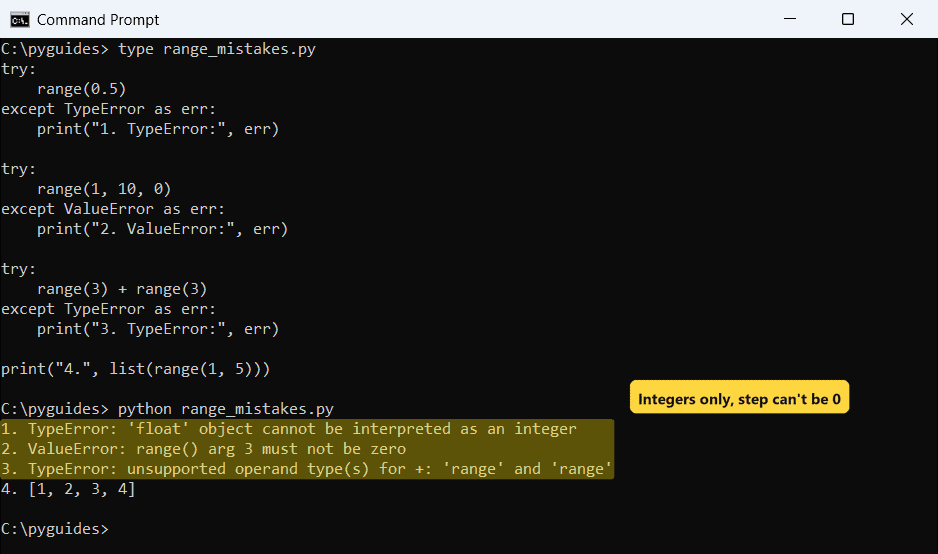 A float, a zero step and + all fail.
- Floats fail; NumPy’s arange() function handles decimal steps.
- A zero step raises ValueError.
- Convert ranges to lists before joining.
- Off by one: range(1, 5) stops at 4.
Wrapping Up the Python range() Function
Python’s range() function builds integer sequences from start, stop and step without storing them, so your loops stay light.
Remember that stop is excluded, then browse more Python built-in functions and methods.
Want more practice with Python loops? Try one of these next:
More Questions on Python range() Function
Does range() include the last number?
No. Use range(1, n + 1) to include n.
Is range a list in Python 3?
No, it’s a lazy sequence. Call list() to get a list.
Can range() go up to a very large number?
Yes, but len() raises OverflowError past sys.maxsize.
How do I loop backward over a list with range()?
Use range(len(items) - 1, -1, -1), or simply reversed(items).
What arguments does range() accept?
Integers, or objects with __index__(). See range in the Python docs.








 English (US)