
 3 hours ago
4
Club.noww.in
pip install --no-cache-dir installs a package without reading from or saving to pip’s cache, so pip downloads it fresh and leaves no copy behind. Use it for smaller Docker images or to rule out a bad cached file:
pip install --no-cache-dir requestsI tested each command in a fresh virtual environment with Python 3.12.5 and pip 26.2.1, using the small tabulate package.
We’ll see what the cache does, install with and without it, turn it off with an environment variable, clear it with pip cache purge, and use the flag in a Dockerfile.
What the pip cache does
By default, pip keeps downloaded files and built wheels in a cache folder. Install the same package again and pip reuses it instead of downloading:
pip --version pip cache dir pip cache purge pip install tabulate pip uninstall -y -q tabulate pip install tabulateOutput:
pip 26.2.1 from C:\pyguides\cachedemo\.venv\Lib\site-packages\pip (python 3.12) c:\pyguides\pipcache Files removed: 6 (1.9 MB) Directories removed: 16 Collecting tabulate Downloading tabulate-0.10.0-py3-none-any.whl.metadata (40 kB) Downloading tabulate-0.10.0-py3-none-any.whl (39 kB) Installing collected packages: tabulate Successfully installed tabulate-0.10.0 Collecting tabulate Using cached tabulate-0.10.0-py3-none-any.whl.metadata (40 kB) Using cached tabulate-0.10.0-py3-none-any.whl (39 kB) Installing collected packages: tabulate Successfully installed tabulate-0.10.0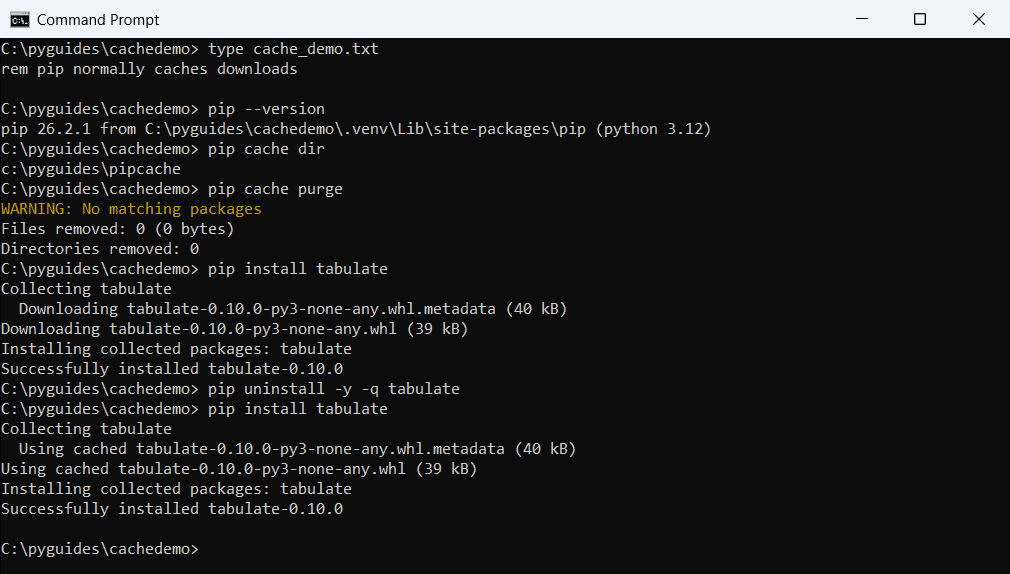 The first install says Downloading; after uninstalling, the reinstall says Using cached.
I pointed the cache at C:\pyguides\pipcache with PIP_CACHE_DIR for this demo. On Windows it normally lives under %LocalAppData%\pip\Cache, and on Linux under ~/.cache/pip.
pip install with –no-cache-dir
With the flag, pip skips the cache entirely. It always downloads, and nothing is saved for next time, as pip cache info confirms:
pip uninstall -y -q tabulate pip cache purge pip install --no-cache-dir tabulate pip cache infoOutput:
Files removed: 6 (89 kB) Directories removed: 16 Collecting tabulate Downloading tabulate-0.10.0-py3-none-any.whl.metadata (40 kB) Downloading tabulate-0.10.0-py3-none-any.whl (39 kB) Installing collected packages: tabulate Successfully installed tabulate-0.10.0 Package index page cache location (pip v23.3+): c:\pyguides\pipcache\http-v2 Package index page cache location (older pips): c:\pyguides\pipcache\http Package index page cache size: 0 bytes Number of HTTP files: 0 Locally built wheels location: c:\pyguides\pipcache\wheels Locally built wheels size: 0 bytes Number of locally built wheels: 0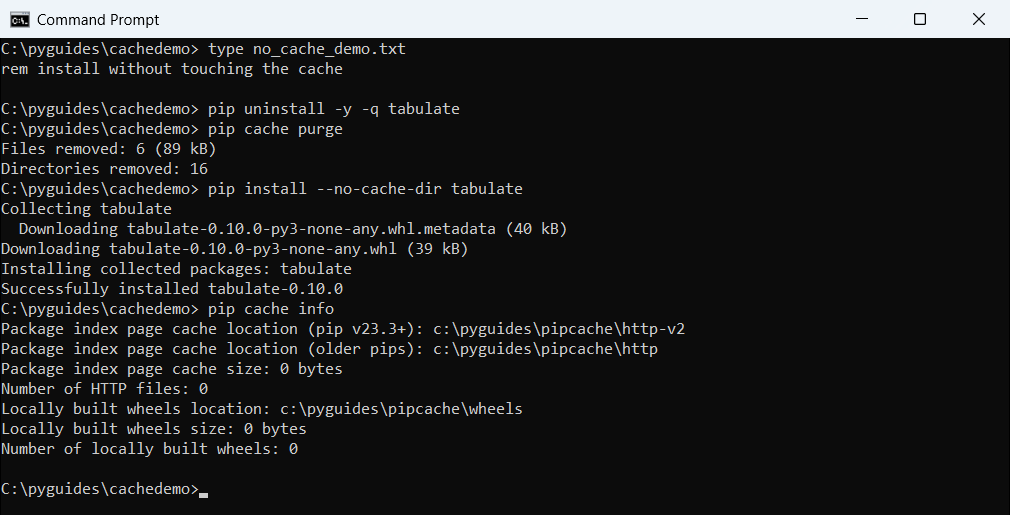 pip downloaded tabulate, and the cache still holds zero HTTP files afterwards.
The package itself installs normally. Only the leftover copy in the cache is gone. For other install options, see pip install a specific version.
When should you use pip –no-cache-dir?
- Docker images: the cache would otherwise be baked into an image layer and waste space.
- CI jobs: on throwaway runners the cache is never reused anyway.
- A corrupt or stale download: forcing a fresh download rules out the cache.
- Low disk space: the cache can grow to gigabytes with big packages like PyTorch.
On your own machine, keep the cache on. It makes reinstalls and new virtual environments much faster.
Turn off the pip cache with an environment variable
Setting PIP_NO_CACHE_DIR has the same effect as the flag for every pip command in that session or container:
set "PIP_NO_CACHE_DIR=1" && pip uninstall -y -q tabulate && pip install tabulate && pip cache infoOutput:
Collecting tabulate Downloading tabulate-0.10.0-py3-none-any.whl.metadata (40 kB) Downloading tabulate-0.10.0-py3-none-any.whl (39 kB) Installing collected packages: tabulate Successfully installed tabulate-0.10.0 ERROR: pip cache commands can not function since cache is disabled.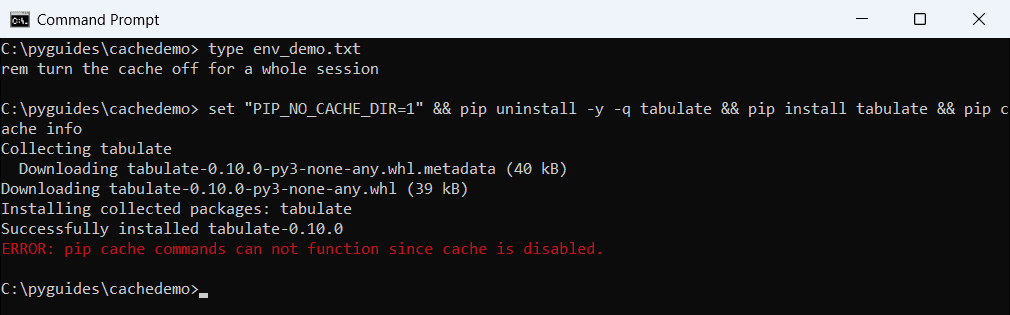 With the variable set, plain pip install downloaded fresh, and pip cache info refused to run because the cache is disabled.
That last error surprises people: while the cache is disabled, the pip cache commands don’t work at all. Unset the variable to inspect or purge it.
Any pip option works as PIP_ plus its name in capitals. To make it permanent you can run pip config set global.no-cache-dir true. More in environment variables in Python.
Clear the pip cache instead
If you just want the disk space back, keep the cache feature and empty it now and then:
pip cache info # location and size pip cache list # locally built wheels pip cache remove numpy # one package pip cache purge # everythingUsing –no-cache-dir in a Dockerfile
FROM python:3.12-slim WORKDIR /app COPY requirements.txt . RUN pip install --no-cache-dir -r requirements.txt COPY . . CMD ["python", "app.py"]This is the most common place you’ll see the flag. It keeps the cache out of the image layer. The requirements file works as usual; see pip install -r requirements.txt.
pip cache options at a glance
| pip install --no-cache-dir pkg | Install without using or filling the cache |
| PIP_NO_CACHE_DIR=1 | Same, for every pip command |
| pip cache purge | Delete everything in the cache |
| pip cache dir | Show where the cache is |
| PIP_CACHE_DIR=path | Move the cache somewhere else |
Here are more pip guides you might need:
- pip install from pyproject.toml
- How to install a module in Python
- ModuleNotFoundError after pip install
- Update Python
Frequently asked questions
What does pip install –no-cache-dir do?
It installs packages without reading from or writing to pip’s cache, so pip downloads fresh and leaves nothing cached.
Why use –no-cache-dir in Docker?
It stops pip’s cache from being stored in the image layer, which keeps images smaller.
Does –no-cache-dir make installs slower?
Only when you’d otherwise reuse a cached file. For a first install, the speed is the same.
How do I clear the pip cache?
Run pip cache purge, or pip cache remove name for one package.
How do I disable the pip cache permanently?
Set the PIP_NO_CACHE_DIR environment variable, or run pip config set global.no-cache-dir true.
Where is the pip cache documented?
See Caching in the pip documentation.




 English (US)