
 1 month ago
59
Club.noww.in
To split a string by dot in TypeScript, call split("."). It returns a string[] of the pieces between each period. Pass the plain string ".", not /./, because an unescaped regex dot matches every character:
const parts: string[] = "store.example.com".split("."); // ["store", "example", "com"]I ran all of this code through TypeScript 7.0.2 and Node.js v22.22.2 with strict mode on, and the outputs below are pasted straight from the console.
split(‘.’) vs split(/./): why does the regex return empty strings?
A string separator is matched literally. In a regular expression, . means “any character”, so every character becomes a separator:
const host: string = "store.austin.example.com"; console.log(host.split(".")); console.log(host.split(".", 2)); // limit: first 2 pieces console.log(host.split(/\./)); // escaped dot = literal dot console.log("1.2.3".split(/./)); // unescaped dot = ANY characterOutput:
[ 'store', 'austin', 'example', 'com' ] [ 'store', 'austin' ] [ 'store', 'austin', 'example', 'com' ] [ '', '', '', '', '', '' ]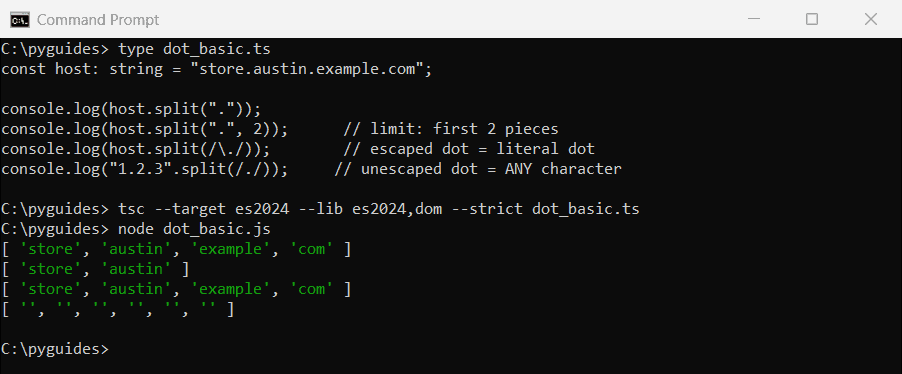 /./ returns only empty strings.
The second argument caps how many pieces you get back. If you need a pattern, escape the dot as /\./; splitting a string by regex in TypeScript covers patterns in depth.
Leading, trailing and consecutive dots
split(".") keeps an empty string wherever two dots touch or a dot sits at either end. Even an empty input returns [""], not []:
"a..b".split("."); // ["a", "", "b"] ".env".split("."); // ["", "env"] "end.".split("."); // ["end", ""] "".split("."); // [""]Don’t filter them out blindly: below, they’re how you’ll spot a dotfile or a broken IP. For dots mixed with commas, see splitting a string with multiple separators.
Split a file name by dot into name and extension
I use lastIndexOf(".") here instead of split(). Earlier dots stay in the name, and a dot at position 0 means a dotfile like .env, which has no extension:
function splitExtension(path: string): { name: string; ext: string } { const file = path.slice(path.lastIndexOf("/") + 1); // ignore dots in folders const dot = file.lastIndexOf("."); if (dot <= 0) return { name: file, ext: "" }; // no dot, or dotfile like .env return { name: file.slice(0, dot), ext: file.slice(dot + 1).toLowerCase() }; } const files = ["invoice-2026-10.PDF", "backup.tar.gz", ".env", "Makefile", "reports/v2.1/summary"]; for (const f of files) { console.log(f.padEnd(22), splitExtension(f)); }Output:
invoice-2026-10.PDF { name: 'invoice-2026-10', ext: 'pdf' } backup.tar.gz { name: 'backup.tar', ext: 'gz' } .env { name: '.env', ext: '' } Makefile { name: 'Makefile', ext: '' } reports/v2.1/summary { name: 'summary', ext: '' }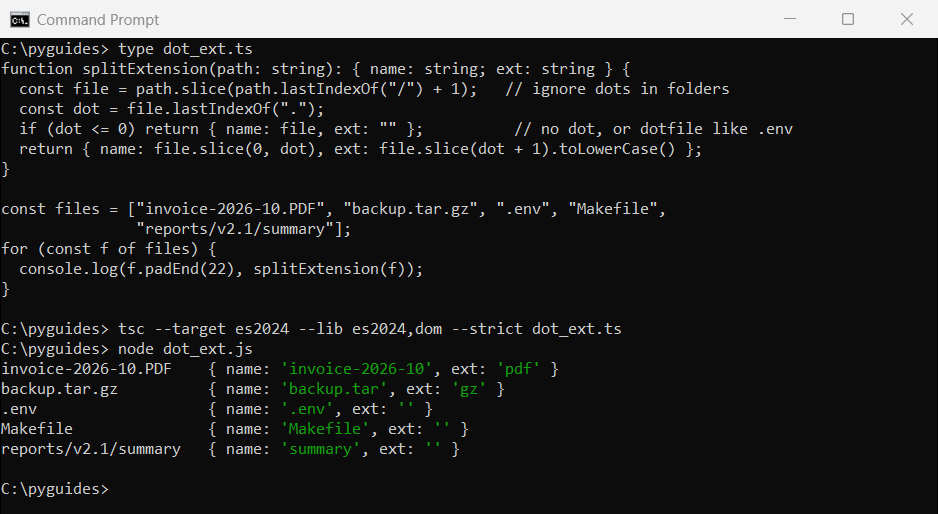 Dotfiles, Makefile and folder dots are handled.
backup.tar.gz returns gz, like Node’s path.extname(). For the last piece of any split, see getting the last element after a split.
How do you compare version strings like 1.10 and 1.9?
Versions aren’t decimals. As strings, "1.10.0" loses to "1.9.3". Split on the dot, convert each part to a number and compare left to right:
const a: string = "1.10.0"; const b: string = "1.9.3"; console.log("string compare says 1.10.0 > 1.9.3:", a > b); function compareVersions(x: string, y: string): number { const xs = x.split(".").map(Number); const ys = y.split(".").map(Number); for (let i = 0; i < Math.max(xs.length, ys.length); i++) { const diff = (xs[i] ?? 0) - (ys[i] ?? 0); // "2.1" equals "2.1.0" if (diff !== 0) return Math.sign(diff); } return 0; } const releases = ["2.0.0", "1.10.0", "1.9.3", "1.2", "1.10.1"]; console.log("sorted:", releases.toSorted(compareVersions));Output:
string compare says 1.10.0 > 1.9.3: false sorted: [ '1.2', '1.9.3', '1.10.0', '1.10.1', '2.0.0' ]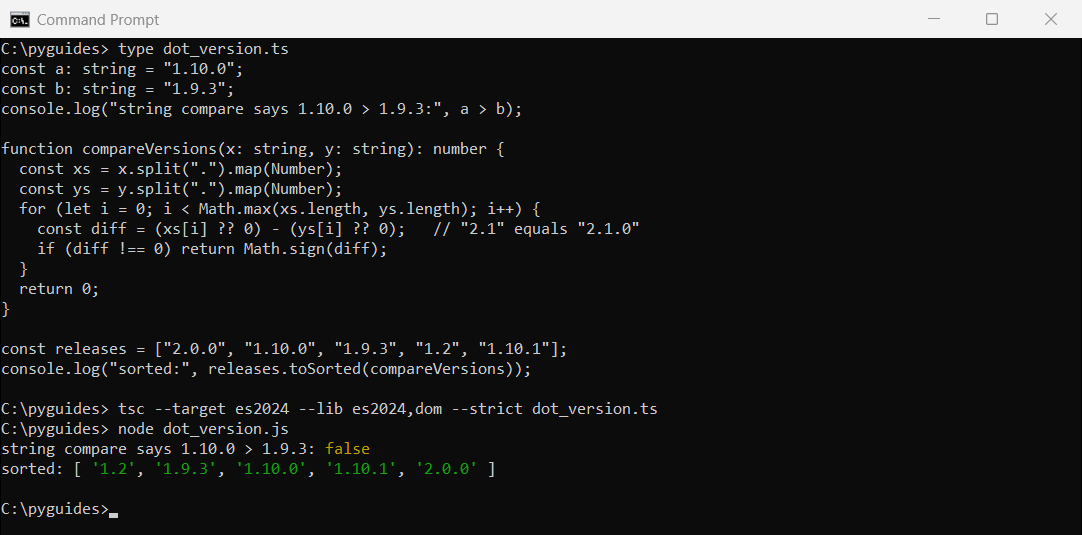 String comparison gets 1.10.0 wrong; numeric parts sort correctly.
a.localeCompare(b, undefined, { numeric: true }) is a shortcut for plain x.y.z versions, but tags like 2.0.0-beta.1 need the npm semver package. More in how to compare strings in TypeScript.
Split a dotted path like customer.address.city into typed access
At runtime it’s just split(".") plus reduce(). Template literal types let the compiler check the path and infer the value type:
type Path<T> = { [K in keyof T & string]: T[K] extends object ? K | `${K}.${Path<T[K]>}` : K; }[keyof T & string]; type PathValue<T, P extends string> = P extends `${infer Head}.${infer Rest}` ? Head extends keyof T ? PathValue<T[Head], Rest> : never : P extends keyof T ? T[P] : never; function getByPath<T, P extends Path<T>>(obj: T, path: P): PathValue<T, P> { return path.split(".").reduce<any>((value, key) => value?.[key], obj); } const order = { id: 1042, total: 89.5, customer: { name: "Dana Brooks", address: { city: "Denver", state: "CO" } }, }; const city = getByPath(order, "customer.address.city"); // type: string const total = getByPath(order, "total"); // type: number console.log(city.toUpperCase(), `$${total.toFixed(2)}`);Output:
DENVER $89.50The payoff is a typo, which the compiler refuses before anything runs:
// same Path, PathValue, getByPath and order as above const city = getByPath(order, "customer.adress.city");Output:
dot_path_typo.ts(20,31): error TS2345: Argument of type '"customer.adress.city"' is not assignable to parameter of type 'Path<{ id: number; total: number; customer: { name: string; address: { city: string; state: string; }; }; }>'.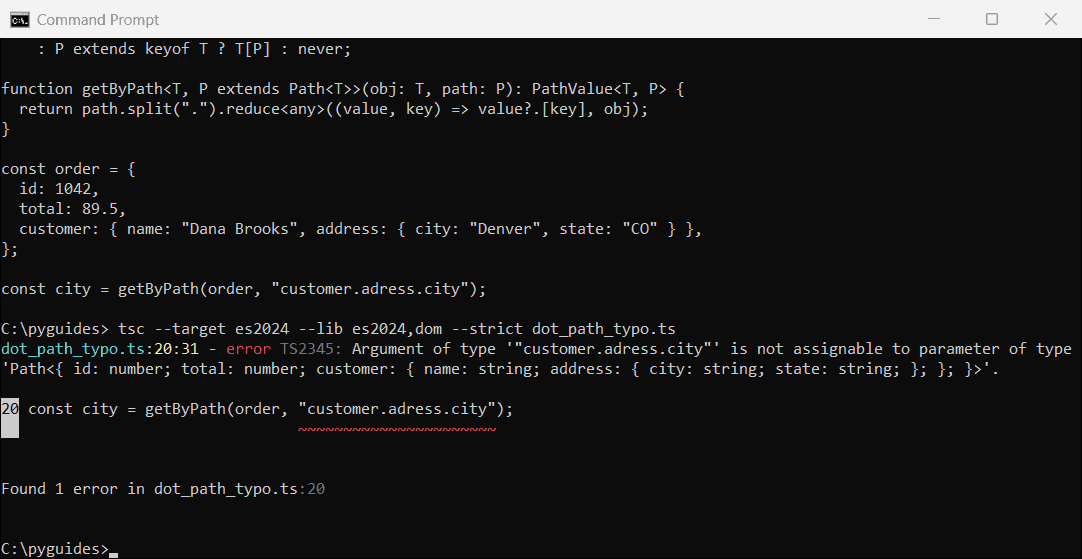 TypeScript rejects the misspelled path at compile time.
For paths built at runtime, type them as string and return unknown. The keyof string guide explains keyof T & string.
Split IP addresses and domain names by dot
A valid IPv4 address has four parts, each a whole number from 0 to 255. The regex per part rejects leading zeros and empty parts:
function parseIPv4(ip: string): number[] | null { const parts = ip.split("."); if (parts.length !== 4) return null; const octets = parts.map((p) => (/^(0|[1-9]\d{0,2})$/.test(p) ? Number(p) : NaN)); return octets.every((n) => n >= 0 && n <= 255) ? octets : null; } for (const ip of ["192.168.1.25", "10.0.0.256", "172.16.01.5", "1.2.3.4."]) { console.log(ip.padEnd(14), parseIPv4(ip)); }Output:
192.168.1.25 [ 192, 168, 1, 25 ] 10.0.0.256 null 172.16.01.5 null 1.2.3.4. nullFor host names, let new URL() extract the host, split it into labels and rejoin the last two:
const urls = ["https://shop.chicago.example.com/cart", "https://news.bbc.co.uk/"]; for (const u of urls) { const labels = new URL(u).hostname.split("."); console.log(labels.slice(-2).join("."), "| sub:", labels.slice(0, -2).join(".")); }Output:
example.com | sub: shop.chicago co.uk | sub: news.bbcco.uk isn’t a real root domain, so suffixes like that need the Public Suffix List. To keep everything after the first dot, see getting the string after a character.
Once dots are handled, you can keep going with a few more string tricks:
- Get the decimal part of a number in TypeScript
- Split a string by new line in TypeScript
- Remove quotes from a string in TypeScript
Frequently asked questions
How do I split a string by dot in TypeScript?
Call str.split("."). It returns a string[] of the parts between each period.
Why does split(/./) return empty strings?
In a regex, . matches any character. Use "." or the escaped /\./.
How do I get a file extension in TypeScript?
Use lastIndexOf("."); an index of 0 or -1 means no extension.
How do I compare version numbers like 1.10 and 1.9?
Split both on dots, map the parts to numbers and compare them left to right.
Where is String.prototype.split documented?
See String.prototype.split() on MDN.








 English (US)