
 4 weeks ago
43
Club.noww.in
The easiest way to move a file in Python is shutil.move(source, destination). Give it a folder and the file goes inside it; give it a full path and the file is moved and renamed in one step:
import shutil shutil.move("invoice.pdf", "archive") # into the archive folder shutil.move("invoice.pdf", "archive/INV-1042.pdf") # move and renameThese examples created, moved and checked real files with Python 3.12.5 on Windows; the screenshots show each script’s Command Prompt run.
I’ll cover shutil.move(), pathlib‘s rename(), what happens when the destination already exists, moving many files by pattern, and moving whole folders.
How to move a file in Python with shutil.move()
shutil.move() returns the file’s new path, which is handy for logging. I like that it works across drives too, by copying the file and then deleting the original:
import os import shutil os.makedirs("archive", exist_ok=True) with open("invoice.pdf", "w") as f: f.write("INV-1042 total $249.99") new_path = shutil.move("invoice.pdf", "archive") # into a folder print("moved to:", new_path) print("still here?", os.path.exists("invoice.pdf")) shutil.move(os.path.join("archive", "invoice.pdf"), os.path.join("archive", "INV-1042.pdf")) print(os.listdir("archive")) # moved and renamedOutput:
moved to: archive\invoice.pdf still here? False ['INV-1042.pdf']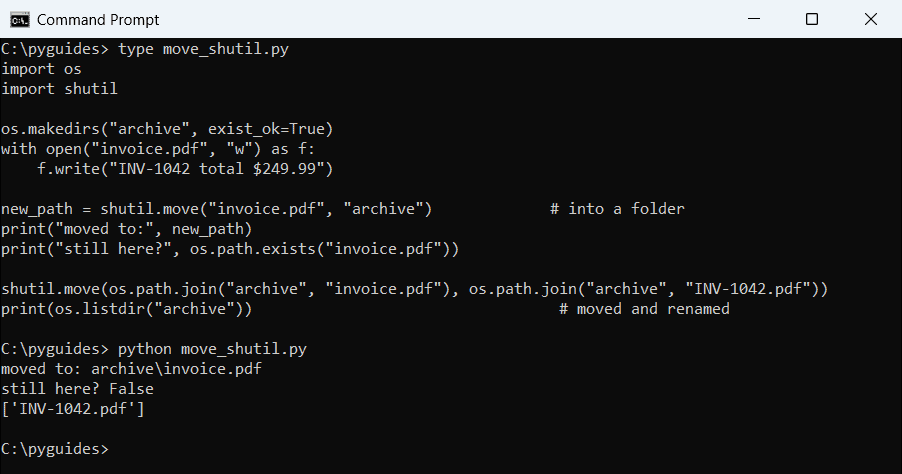 The first call moves the file into archive; the second renames it in place.
If you want to keep your original, you’re copying, not moving. See shutil copy file in Python for that.
Moving a file with pathlib
Path.rename() moves a file to a new path and returns a Path for it. It’s a thin wrapper around os.rename(), so it only works within the same drive:
from pathlib import Path Path("processed").mkdir(exist_ok=True) src = Path("notes.txt") src.write_text("call the Denver store", encoding="utf-8") dst = src.rename(Path("processed") / "notes-2026-10-26.txt") # returns the new path print("new path:", dst) print("old exists?", src.exists(), "| new exists?", dst.exists())Output:
new path: processed\notes-2026-10-26.txt old exists? False | new exists? True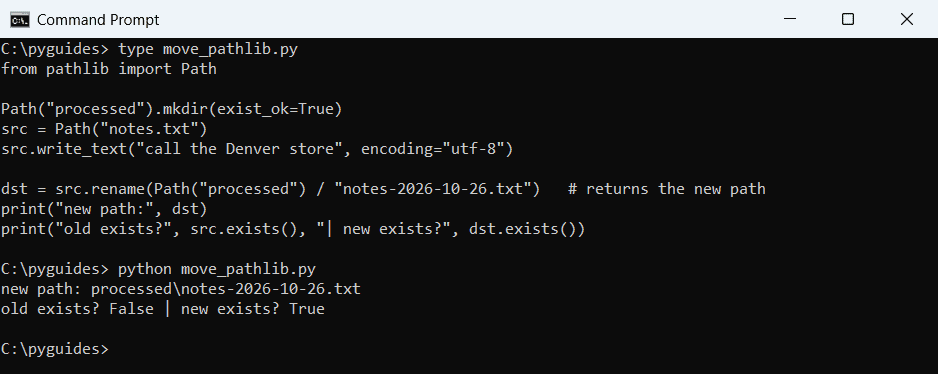 rename() gives back the new path, and the old one no longer exists.
You’ll want shutil.move() instead when the destination might be on another drive, such as a USB stick or network share.
What if the destination file already exists?
This is where the functions differ. On Windows, os.rename() and Path.rename() refuse to overwrite. os.replace() and Path.replace() overwrite on every OS:
import os for name, text in [("draft.txt", "v2"), ("final.txt", "v1")]: with open(name, "w") as f: f.write(text) try: os.rename("draft.txt", "final.txt") # Windows refuses to overwrite except FileExistsError as err: print("FileExistsError:", err) os.replace("draft.txt", "final.txt") # replace overwrites on every OS print(open("final.txt").read(), "| draft left?", os.path.exists("draft.txt"))Output:
FileExistsError: [WinError 183] Cannot create a file when that file already exists: 'draft.txt' -> 'final.txt' v2 | draft left? False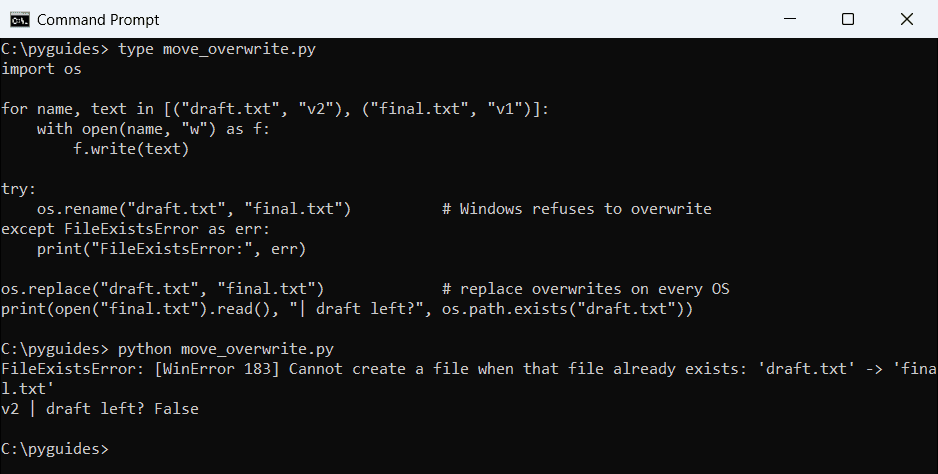 [WinError 183] means the target already exists. os.replace() swaps the file in.
| shutil.move(src, file) | Overwrites | Yes |
| shutil.move(src, folder) | shutil.Error if same name inside | Yes |
| os.rename() / Path.rename() | FileExistsError | No |
| os.replace() / Path.replace() | Overwrites | No |
On macOS and Linux, os.rename() silently overwrites, so code that works there can fail on Windows. If you expect to overwrite, I’d say so explicitly with replace().
Moving multiple files in Python
Combine Path.glob() with shutil.move() to move every file that matches a pattern, like all the CSVs in a downloads folder:
import shutil from pathlib import Path inbox = Path("inbox") inbox.mkdir(exist_ok=True) for name in ["jan.csv", "feb.csv", "mar.csv", "readme.txt", "logo.png"]: (inbox / name).write_text("sample", encoding="utf-8") reports = Path("reports") reports.mkdir(exist_ok=True) for csv_file in inbox.glob("*.csv"): shutil.move(csv_file, reports / csv_file.name) print("reports:", sorted(p.name for p in reports.iterdir())) print("inbox: ", sorted(p.name for p in inbox.iterdir()))Output:
reports: ['feb.csv', 'jan.csv', 'mar.csv'] inbox: ['logo.png', 'readme.txt']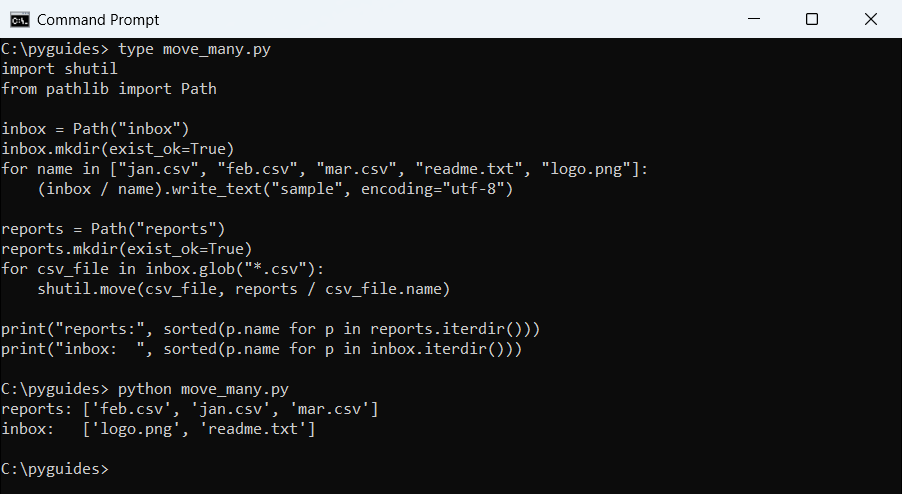 Only the three CSV files moved; the text file and the image stayed in inbox.
Use rglob("*.csv") to include subfolders. To see what’s in a folder first, check listing files in a directory.
Moving a folder (and the shutil.Error trap)
shutil.move() works on folders too, moving everything inside. But if a file with the same name already exists in the destination folder, it raises shutil.Error:
import shutil from pathlib import Path (Path("old_reports") / "2026").mkdir(parents=True, exist_ok=True) (Path("old_reports") / "2026" / "q3.csv").write_text("sales", encoding="utf-8") shutil.move("old_reports", "new_reports") # renames the whole folder tree print([str(p) for p in Path("new_reports").rglob("*")]) Path("dest").mkdir(exist_ok=True) (Path("dest") / "summary.csv").write_text("old", encoding="utf-8") Path("summary.csv").write_text("new", encoding="utf-8") try: shutil.move("summary.csv", "dest") # same name already inside dest except shutil.Error as err: print("shutil.Error:", err)Output:
['new_reports\\2026', 'new_reports\\2026\\q3.csv'] shutil.Error: Destination path 'dest\summary.csv' already existsTo overwrite in that case, pass the full destination file path instead of the folder. For creating destination folders safely, see how to make a directory in Python.
Other file-handling guides you can use alongside this one:
- Copy files to another directory
- Check if a file exists in Python
- os.path.join() in Python
- Get the filename from a path
Frequently asked questions
How do I move a file in Python?
Use shutil.move("file.txt", "folder"). It moves the file into the folder, or to a new name if you give a full file path.
What’s the difference between shutil.move and os.rename?
shutil.move() works across drives and can move into a folder. os.rename() only works on the same drive and fails on Windows if the target exists.
How do I move a file and overwrite the destination?
Use os.replace(src, dst) or Path(src).replace(dst), which overwrite on every OS.
How do I move all files of one type?
Loop over Path("folder").glob("*.csv") and call shutil.move() on each file.
Can shutil.move move a whole folder?
Yes. It moves the folder and everything inside it, or renames it if the destination doesn’t exist.
Where is shutil.move documented?
See shutil.move in the Python docs.








 English (US)