
 31 minutes ago
3
Club.noww.in
Here’s how to make a Python script executable: on Linux or macOS, add a shebang line and run chmod +x. On Windows, use the py launcher or a .bat wrapper, or build an .exe with PyInstaller:
#!/usr/bin/env python3 # first line of the script chmod +x invoice.py # Linux / macOS ./invoice.pyThe Windows screenshots come from my Windows 11 machine with Python 3.12.5 and PyInstaller 6.22.3. The Linux and macOS steps follow the official Python docs.
I’ll start with the shebang and chmod, then the Windows options: the py launcher, a batch file you can call from any folder, and a standalone exe.
The example script
Every method uses the same small script. It adds prices from the command line and applies Austin’s 8.25% sales tax. The if __name__ == "__main__" guard keeps it importable:
#!/usr/bin/env python3 """Add up prices from the command line and show the total with Austin, TX sales tax.""" import sys def main(): prices = [float(p) for p in sys.argv[1:]] or [19.99, 5.25] subtotal = sum(prices) print(f"Items: {len(prices)} | Subtotal: ${subtotal:,.2f} | Total: ${subtotal * 1.0825:,.2f}") print(f"Running on Python {sys.version.split()[0]}") if __name__ == "__main__": main()Output:
Items: 3 | Subtotal: $127.24 | Total: $137.74 Running on Python 3.12.5 Items: 1 | Subtotal: $45.00 | Total: $48.71 Running on Python 3.12.5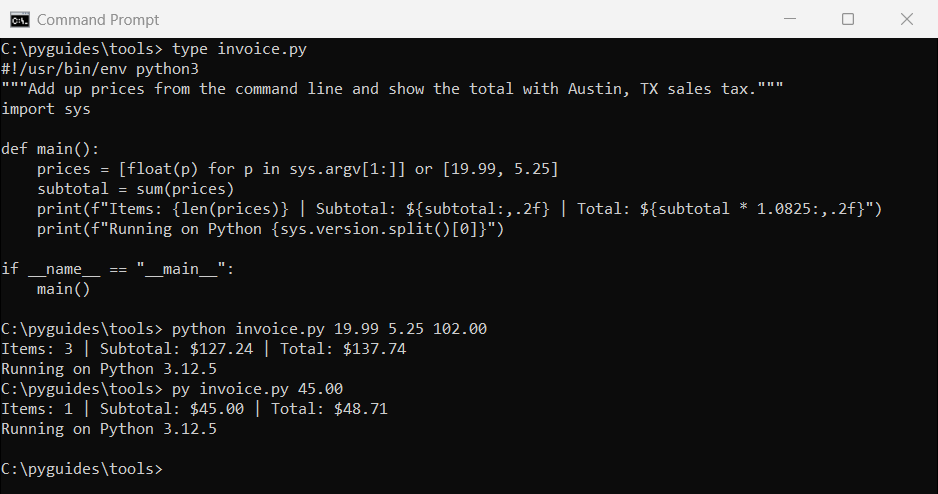 Both python invoice.py and py invoice.py run it; the py launcher also reads the shebang line.
Command-line arguments arrive in sys.argv. More ways to run files are in how to run a Python script.
Make a Python script executable on Linux and macOS
- Add #!/usr/bin/env python3 as the very first line, with no blank line or spaces before it.
- Make it executable: chmod +x invoice.py.
- Run it with ./invoice.py 19.99 5.25.
- To run it by name from anywhere, move it into a folder on your PATH, such as ~/.local/bin, and optionally drop the .py.
/usr/bin/env python3 finds whichever python3 comes first on your PATH, so it respects an activated virtual environment. If you see bad interpreter: ^M, the file has Windows line endings; convert it with dos2unix.
How do you make a Python script executable on Windows?
Windows doesn’t use chmod or the executable bit. It decides what to do from the file extension. You’ve got three practical options:
- py launcher: py invoice.py. It’s installed with Python from python.org and honors shebang lines such as python3.
- File association: the python.org installer can associate .py files so double-clicking or typing invoice.py runs them.
- A wrapper or exe: a .bat file or a PyInstaller build, shown next.
If you’ve got several Python versions, the shebang (or py -3.13) picks the one you want; see install multiple Python versions.
Run your script from any folder with a .bat file
A two-line batch file next to the script turns it into a command. %~dp0 is the batch file’s own folder, and %* passes all arguments along:
@echo off rem invoice.bat: run invoice.py from anywhere, passing all arguments along python "%~dp0invoice.py" %*Now invoice works like any other command in that folder, with no python or .py to type:
invoice 12.50 7.25Output:
Items: 2 | Subtotal: $19.75 | Total: $21.38 Running on Python 3.12.5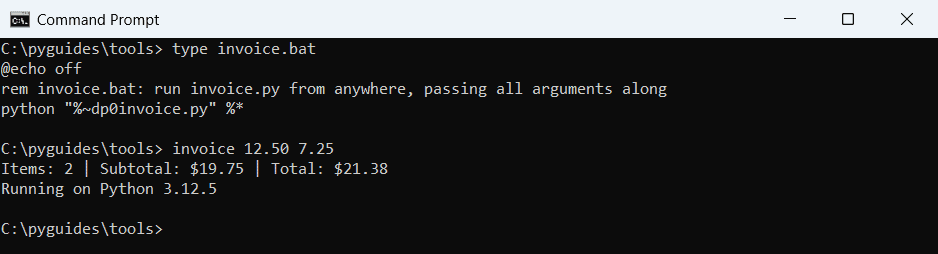 Typing invoice runs the script through the wrapper and passes both prices along.
To use it from any folder, add its folder to your PATH under Settings > System > About > Advanced system settings > Environment Variables, then open a new Command Prompt.
Turn a Python script into an .exe with PyInstaller
If people without Python need to run it, build a standalone executable. --onefile bundles Python and your script into one .exe:
pip install pyinstaller python -m PyInstaller --onefile --log-level WARN --distpath dist --workpath build --specpath build invoice.py dir /b dist dist\invoice.exe 19.99 5.25 102.00Output:
186 INFO: PyInstaller: 6.22.3, contrib hooks: 2026.8 187 INFO: Python: 3.12.5 232 INFO: Platform: Windows-11-10.0.26200-SP0 232 INFO: Python environment: C:\pyguides\venv 233 INFO: wrote build\invoice.spec invoice.exe Items: 3 | Subtotal: $127.24 | Total: $137.74 Running on Python 3.12.5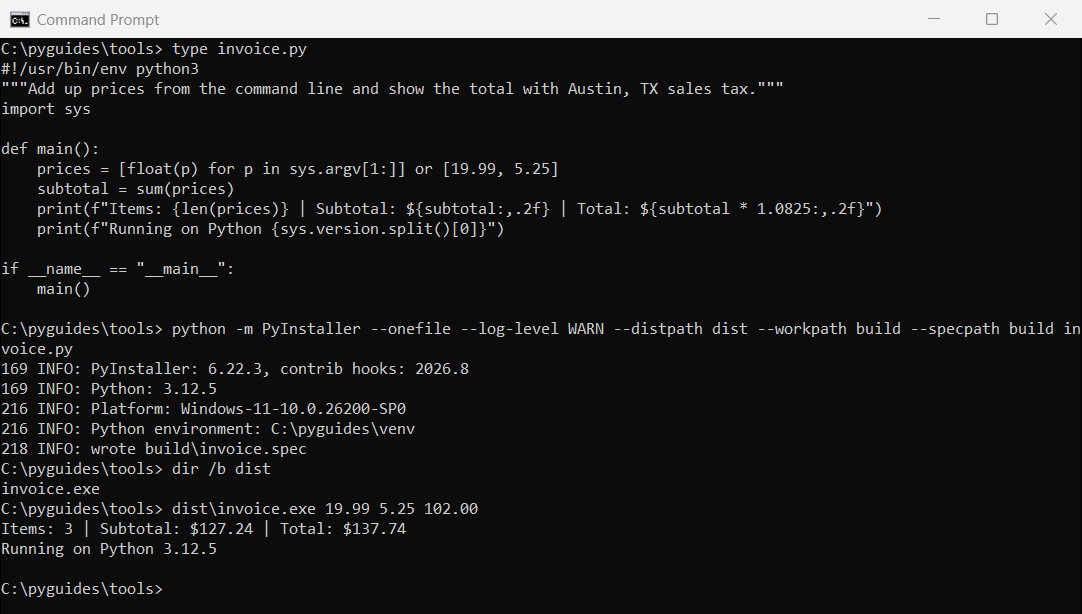 PyInstaller built dist\invoice.exe, and it runs with no separate Python install.
The exe only runs on the operating system you built it on, so build on each system you need. More options, like icons and hiding the console window, are in convert a Python file to exe with PyInstaller.
Which option should you choose?
| Run with ./script on Linux/macOS | Shebang + chmod +x |
| Quick runs on Windows | py script.py |
| Use it as a command from any folder | PATH folder + shebang (Unix) or .bat wrapper (Windows) |
| Share with people who don’t have Python | PyInstaller --onefile |
| Share with Python users | A package with a console script entry point |
That last option is a [project.scripts] entry in pyproject.toml; see pip install from pyproject.toml.
More guides for running and sharing Python code:
- Run shell commands in Python
- Environment variables in Python
- What is IDLE in Python
- How to create an app using Python
Frequently asked questions
How do I make a Python script executable?
On Linux or macOS, add #!/usr/bin/env python3 as the first line and run chmod +x script.py. On Windows, use py script.py, a .bat wrapper or PyInstaller.
What does #!/usr/bin/env python3 do?
It tells the system which interpreter runs the file. env finds python3 on your PATH.
Does the shebang do anything on Windows?
Windows ignores it, but the py launcher reads it to pick a Python version.
Why do I get permission denied running ./script.py?
The file isn’t marked executable. Run chmod +x script.py.
How do I turn a Python script into an exe?
Install PyInstaller and run pyinstaller --onefile script.py; the exe appears in the dist folder.
Where is the shebang behavior documented?
See Shebang Lines in the Python docs.




 English (US)