
 2 weeks ago
40
Club.noww.in
You join two DataFrames in pandas with pd.merge(left, right, on="key"), or the method form left.merge(right, on="key", how="left"). It works like a SQL join, matching rows that share a key:
orders.merge(customers, on="customer_id", how="left")Every result below came from Python 3.12.5 with pandas 3.0.6, joining a small orders table to a customers table.
I’ll cover inner and left joins, all four join types side by side, merging on the index with join(), different key names and overlapping columns, and a safety check that catches duplicate keys.
How to join two DataFrames with pd.merge()
Here’s the sample data you’ll join: four customers and five orders. Order 105 belongs to customer 5, who isn’t in the customers table, and customer 4 has no orders:
import pandas as pd customers = pd.DataFrame({ "customer_id": [1, 2, 3, 4], "name": ["Ava", "Ben", "Cara", "Dev"], "state": ["TX", "CO", "MA", "FL"], }) orders = pd.DataFrame({ "order_id": [101, 102, 103, 104, 105], "customer_id": [1, 2, 2, 3, 5], # customer 5 isn't in the customers table "amount": [59.99, 120.00, 35.50, 89.25, 15.00], }) both = pd.merge(orders, customers, on="customer_id") # inner join by default print(both)Output:
order_id customer_id amount name state 0 101 1 59.99 Ava TX 1 102 2 120.00 Ben CO 2 103 2 35.50 Ben CO 3 104 3 89.25 Cara MA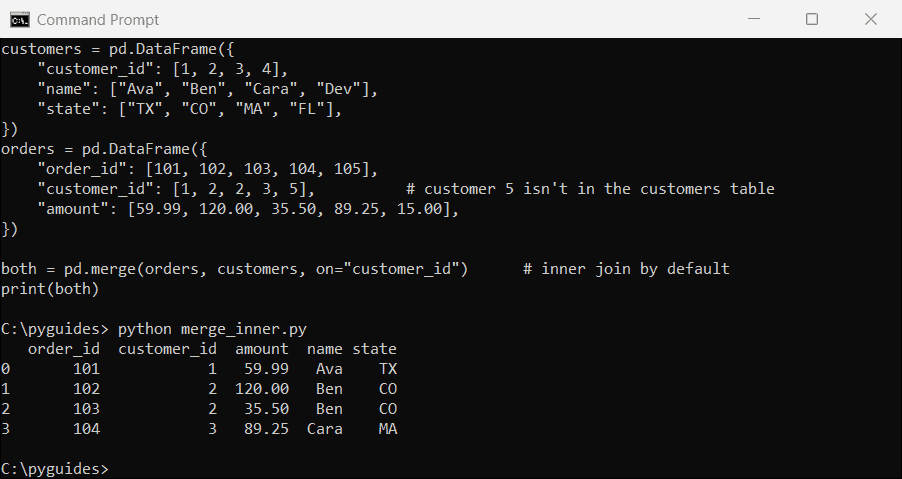 An inner join keeps only matching rows: order 105 and customer Dev both drop out.
merge() defaults to an inner join. Ben has two orders, so he appears twice; the customer data repeats for each matching order.
Left join in pandas (keep every row from the left)
A left join keeps every order, matched or not, and fills missing customer data with NaN. Add indicator=True to see where each row came from:
import pandas as pd customers = pd.DataFrame({ "customer_id": [1, 2, 3, 4], "name": ["Ava", "Ben", "Cara", "Dev"], "state": ["TX", "CO", "MA", "FL"], }) orders = pd.DataFrame({ "order_id": [101, 102, 103, 104, 105], "customer_id": [1, 2, 2, 3, 5], # customer 5 isn't in the customers table "amount": [59.99, 120.00, 35.50, 89.25, 15.00], }) left = orders.merge(customers, on="customer_id", how="left", indicator=True) print(left[["order_id", "customer_id", "name", "amount", "_merge"]]) print("\nunmatched orders:") print(left.loc[left["_merge"] == "left_only", ["order_id", "customer_id"]])Output:
order_id customer_id name amount _merge 0 101 1 Ava 59.99 both 1 102 2 Ben 120.00 both 2 103 2 Ben 35.50 both 3 104 3 Cara 89.25 both 4 105 5 NaN 15.00 left_only unmatched orders: order_id customer_id 4 105 5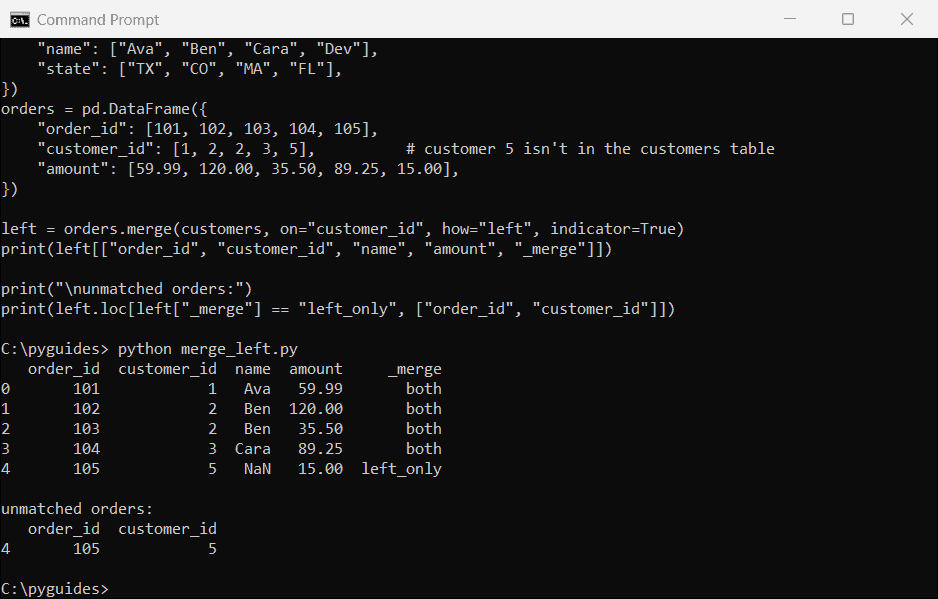 Order 105 shows left_only: there’s no customer 5. That’s how you find orphaned records.
I use this pattern constantly for data checks. Filtering on _merge == "left_only" lists every record that didn’t find a match.
Inner vs left vs right vs outer join
The how argument lets you pick which keys survive. Running all four on the same data shows the difference in row counts:
import pandas as pd customers = pd.DataFrame({ "customer_id": [1, 2, 3, 4], "name": ["Ava", "Ben", "Cara", "Dev"], "state": ["TX", "CO", "MA", "FL"], }) orders = pd.DataFrame({ "order_id": [101, 102, 103, 104, 105], "customer_id": [1, 2, 2, 3, 5], # customer 5 isn't in the customers table "amount": [59.99, 120.00, 35.50, 89.25, 15.00], }) for how in ["inner", "left", "right", "outer"]: result = orders.merge(customers, on="customer_id", how=how) print(f"{how:<6} -> {len(result)} rows, customer_ids {sorted(result['customer_id'].unique().tolist())}")Output:
inner -> 4 rows, customer_ids [1, 2, 3] left -> 5 rows, customer_ids [1, 2, 3, 5] right -> 5 rows, customer_ids [1, 2, 3, 4] outer -> 6 rows, customer_ids [1, 2, 3, 4, 5]| "inner" (default) | Keys in both tables | INNER JOIN |
| "left" | All keys from the left table | LEFT JOIN |
| "right" | All keys from the right table | RIGHT JOIN |
| "outer" | All keys from both | FULL OUTER JOIN |
| "cross" | Every combination of rows | CROSS JOIN |
How do you merge on the index in pandas?
When your key is the index, DataFrame.join() is the shortest option. With merge(), pass left_index=True and right_index=True:
import pandas as pd customers = pd.DataFrame({ "customer_id": [1, 2, 3, 4], "name": ["Ava", "Ben", "Cara", "Dev"], "state": ["TX", "CO", "MA", "FL"], }) orders = pd.DataFrame({ "order_id": [101, 102, 103, 104, 105], "customer_id": [1, 2, 2, 3, 5], # customer 5 isn't in the customers table "amount": [59.99, 120.00, 35.50, 89.25, 15.00], }) cust = customers.set_index("customer_id") spend = orders.groupby("customer_id")["amount"].sum().rename("total_spent") print(cust.join(spend)) # join() matches on the index print() print(pd.merge(cust, spend, left_index=True, right_index=True, how="left").fillna({"total_spent": 0.0}))Output:
name state total_spent customer_id 1 Ava TX 59.99 2 Ben CO 155.50 3 Cara MA 89.25 4 Dev FL NaN name state total_spent customer_id 1 Ava TX 59.99 2 Ben CO 155.50 3 Cara MA 89.25 4 Dev FL 0.00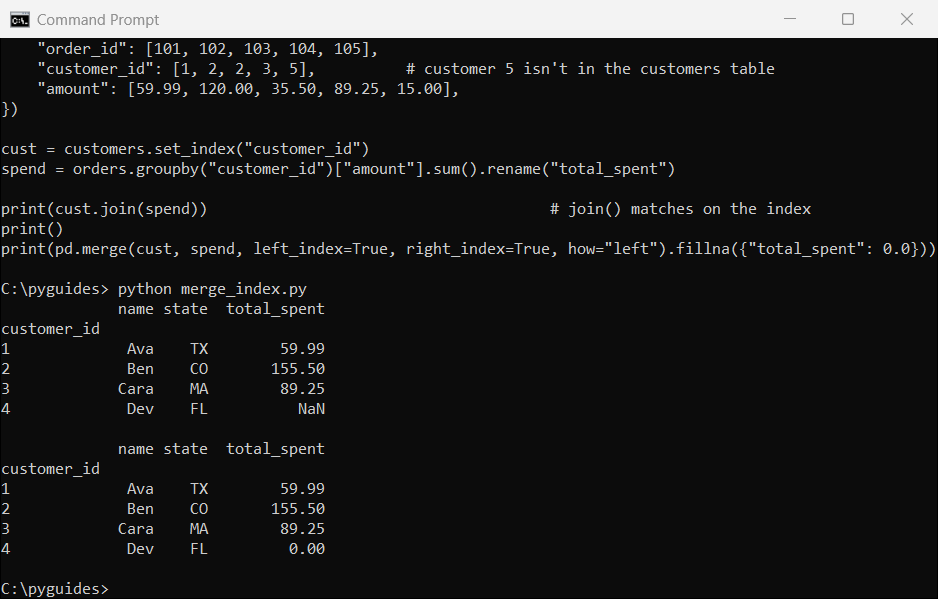 Both match the same rows. fillna() turns Dev’s missing total into 0.0 in the second version.
join() defaults to a left join. To move a column into the index first, use set_index(); to move it back, see pandas index to column.
Merging DataFrames with different key names
If your key columns have different names, use left_on and right_on. When both tables share a non-key column, suffixes keeps the two versions apart:
import pandas as pd stores = pd.DataFrame({"store_code": ["AUS", "DEN"], "city": ["Austin", "Denver"], "region": ["South", "West"]}) sales = pd.DataFrame({"store": ["AUS", "AUS", "DEN"], "region": ["S", "S", "W"], "sales": [1250.50, 980.25, 1430.00]}) merged = sales.merge(stores, left_on="store", right_on="store_code", suffixes=("_sales", "_store")) print(merged.drop(columns="store_code"))Output:
store region_sales sales city region_store 0 AUS S 1250.50 Austin South 1 AUS S 980.25 Austin South 2 DEN W 1430.00 Denver WestDrop the duplicate key column afterward, as shown. For renaming columns before a merge, see renaming columns in pandas.
Catching duplicate keys in a pandas merge with validate
A duplicate key on the “one” side silently multiplies your rows. validate="many_to_one" makes pandas raise an error instead of quietly inflating your totals:
import pandas as pd customers = pd.DataFrame({"customer_id": [1, 2, 2], "name": ["Ava", "Ben", "Ben (dup)"]}) orders = pd.DataFrame({"customer_id": [1, 2], "amount": [59.99, 120.00]}) print(len(orders.merge(customers, on="customer_id")), "rows from 2 orders (a duplicate customer doubled one)") try: orders.merge(customers, on="customer_id", validate="many_to_one") except pd.errors.MergeError as err: print("MergeError:", err)Output:
3 rows from 2 orders (a duplicate customer doubled one) MergeError: Merge keys are not unique in right dataset; not a many-to-one merge Duplicates in right: customer_id 2 ...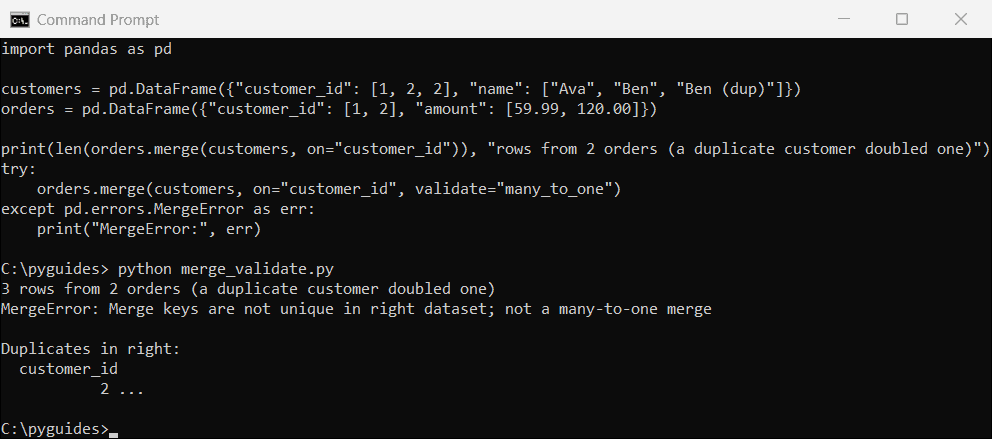 Two orders became three rows. With validate, pandas refuses to merge and names the problem.
I add validate to any merge feeding a report. It costs nothing and catches the kind of bug that otherwise shows up as wrong revenue numbers.
merge vs join vs concat
| pd.merge() / .merge() | Columns, matched by key columns or index | Most joins |
| .join() | Columns, matched on the index | Quick index-based joins |
| pd.concat() | Rows (or columns) stacked, no matching | Appending tables with the same columns |
For stacking rather than joining, see pandas concat with ignore_index.
More pandas guides you’ll find handy:
- loc vs iloc in pandas
- Filter with multiple conditions
- Sort by column in pandas
- How to use Python in Excel
Frequently asked questions
How do I join two DataFrames in pandas?
Use pd.merge(df1, df2, on="key"). Add how="left", "right" or "outer" to control which rows are kept.
What’s the difference between merge and join in pandas?
merge() joins on columns or the index and is the most flexible. join() is a shortcut that joins on the index.
How do I do a left join in pandas?
Call left_df.merge(right_df, on="key", how="left"). Unmatched rows get NaN for the right table’s columns.
How do I merge on the index?
Use df1.join(df2), or pd.merge(df1, df2, left_index=True, right_index=True).
Why did my merge create more rows than expected?
One side has duplicate keys. Check with validate="many_to_one" or df["key"].duplicated().sum().
Where is merge documented?
See DataFrame.merge in the pandas reference.








 English (US)