
 1 month ago
42
Club.noww.in
To get the first and last day of week in TypeScript, copy the date, subtract getDay() days with setDate() to reach Sunday, then add 6 days to reach Saturday:
start.setDate(start.getDate() - start.getDay()); // Sunday end.setDate(start.getDate() + 6); // SaturdayMy test box runs on Chicago time, so the DST dates below are real US ones. I built each file with TypeScript 7.0.2 and Node.js v22.22.2 under --strict.
Get the first and last day of a Sunday-start week
getDay() returns 0 (Sunday) to 6 (Saturday), which is how many days you are past Sunday. The times are set so the range covers whole days:
const fmt = (d: Date) => `${d.toDateString()} ${d.toLocaleTimeString("en-US")}`; function getWeekBounds(date: Date): { start: Date; end: Date } { const start = new Date(date); // copy, never mutate the input start.setDate(start.getDate() - start.getDay()); // back to Sunday start.setHours(0, 0, 0, 0); const end = new Date(start); end.setDate(start.getDate() + 6); // forward to Saturday end.setHours(23, 59, 59, 999); return { start, end }; } const { start, end } = getWeekBounds(new Date(2026, 9, 14, 15, 30)); // Wed, Oct 14, 2026 console.log("first:", fmt(start)); console.log("last: ", fmt(end));Output:
first: Sun Oct 11 2026 12:00:00 AM last: Sat Oct 17 2026 11:59:59 PMI copy the date because setDate() mutates it in place. New to Date? See my TypeScript Date guide.
Monday-start (ISO) weeks with one helper
ISO 8601 and most of Europe start the week on Monday. A weekStartsOn parameter handles any start day with (getDay() - weekStartsOn + 7) % 7:
const fmt = (d: Date) => `${d.toDateString()} ${d.toLocaleTimeString("en-US")}`; type WeekStart = 0 | 1 | 2 | 3 | 4 | 5 | 6; // 0 = Sunday, 1 = Monday function getWeekBounds(date: Date, weekStartsOn: WeekStart = 0) { const offset = (date.getDay() - weekStartsOn + 7) % 7; // days since week start const start = new Date(date.getFullYear(), date.getMonth(), date.getDate() - offset); const end = new Date(start.getFullYear(), start.getMonth(), start.getDate() + 6, 23, 59, 59, 999); return { start, end }; } const sunday = new Date(2026, 9, 18); // Sun, Oct 18, 2026 for (const ws of [0, 1] as const) { const { start, end } = getWeekBounds(sunday, ws); console.log(ws === 0 ? "Sun start:" : "Mon start:", fmt(start), "->", fmt(end)); } const naive = new Date(sunday); naive.setDate(sunday.getDate() - sunday.getDay() + 1); // popular snippet console.log("naive Monday:", fmt(naive));Output:
Sun start: Sun Oct 18 2026 12:00:00 AM -> Sat Oct 24 2026 11:59:59 PM Mon start: Mon Oct 12 2026 12:00:00 AM -> Sun Oct 18 2026 11:59:59 PM naive Monday: Mon Oct 19 2026 12:00:00 AM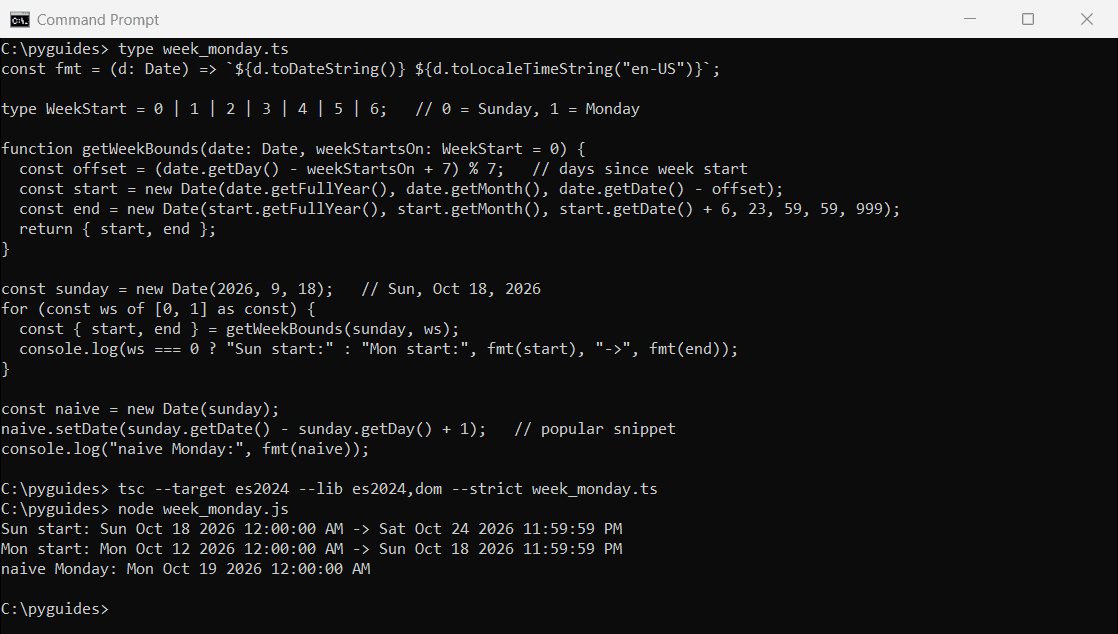 One Sunday, two different weeks, and the popular one-liner jumps to the next Monday.
Check the last line: on a Sunday, getDate() - getDay() + 1 returns tomorrow. The modulo offset won’t, and week numbers are covered in how to get the week number from a date in TypeScript.
Typing weekStartsOn as a union means you can’t pass a bad value like 7:
type WeekStart = 0 | 1 | 2 | 3 | 4 | 5 | 6; declare function getWeekStart(date: Date, weekStartsOn?: WeekStart): Date; getWeekStart(new Date(2026, 9, 14), 7); // meant "Sunday = 7"Output:
week_badstart.ts(5,37): error TS2345: Argument of type '7' is not assignable to parameter of type 'WeekStart | undefined'.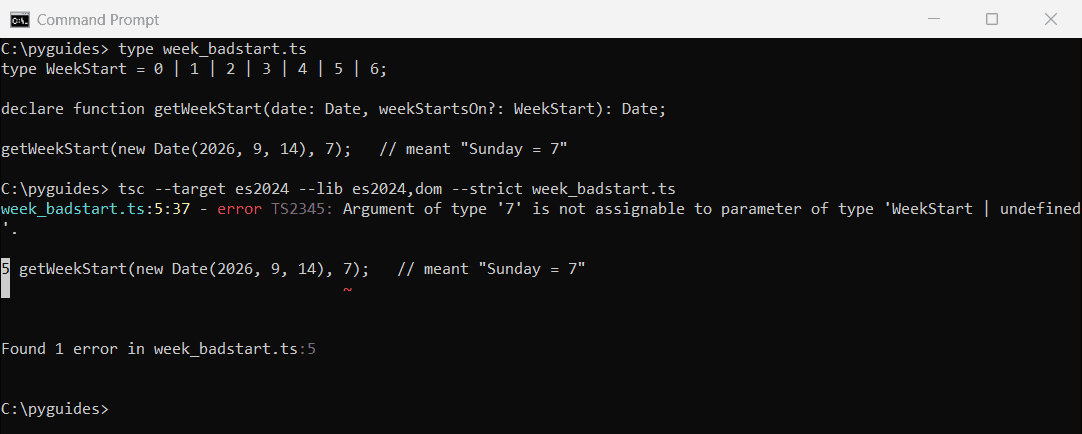 A plain number would compile and silently return the wrong week.
Does the week work across month and year boundaries?
Yes. Day values outside the month roll into the neighboring month or year:
for (const d of [new Date(2026, 0, 1), new Date(2026, 9, 1), new Date(2026, 11, 31)]) { const start = new Date(d.getFullYear(), d.getMonth(), d.getDate() - d.getDay()); const end = new Date(d.getFullYear(), d.getMonth(), d.getDate() - d.getDay() + 6); console.log(d.toDateString(), "| week:", start.toDateString(), "->", end.toDateString()); }Output:
Thu Jan 01 2026 | week: Sun Dec 28 2025 -> Sat Jan 03 2026 Thu Oct 01 2026 | week: Sun Sep 27 2026 -> Sat Oct 03 2026 Thu Dec 31 2026 | week: Sun Dec 27 2026 -> Sat Jan 02 2027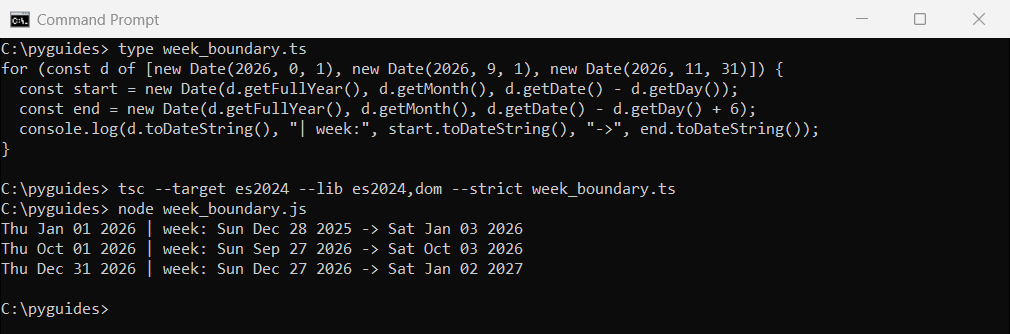 January 1, 2026 sits in a week that starts on December 28, 2025.
To test whether an order falls inside that week, compare timestamps as shown in comparing dates in TypeScript, or check if a date is before today.
Why the last day of the week is off by an hour around DST
It’s tempting to add 7 * 86_400_000 ms, but you’ll hit DST: in US zones the weeks of March 8 and November 1, 2026 aren’t 168 hours long:
const fmt = (d: Date) => `${d.toDateString()} ${d.toLocaleTimeString("en-US")}`; for (const sun of [new Date(2026, 2, 8), new Date(2026, 10, 1)]) { // DST starts, ends const byMs = new Date(sun.getTime() + 7 * 86_400_000 - 1); const byCal = new Date(sun.getFullYear(), sun.getMonth(), sun.getDate() + 6, 23, 59, 59, 999); console.log(sun.toDateString(), "| ms math:", fmt(byMs), "| setDate:", fmt(byCal)); }Output:
Sun Mar 08 2026 | ms math: Sun Mar 15 2026 12:59:59 AM | setDate: Sat Mar 14 2026 11:59:59 PM Sun Nov 01 2026 | ms math: Sat Nov 07 2026 10:59:59 PM | setDate: Sat Nov 07 2026 11:59:59 PM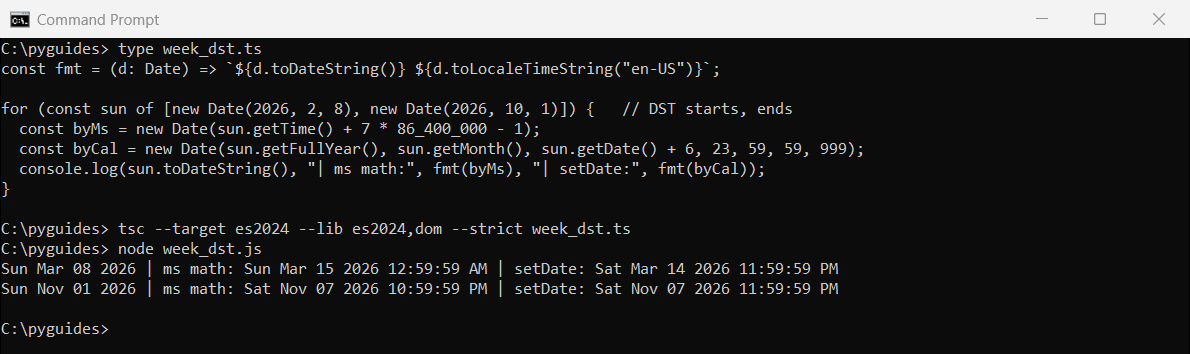 Millisecond math spills into Sunday in March and stops an hour early in November.
Calendar math with setDate() keeps local wall-clock time right, the same rule as when you calculate the difference between dates in days. For UTC weeks on a server, use getUTCDay() and setUTCDate() instead.
Get the start and end of the week with date-fns
Already on date-fns? startOfWeek() and endOfWeek() do this. Pass weekStartsOn: 1 for Monday:
import { startOfWeek, endOfWeek } from "date-fns"; const shipDate = new Date(2026, 9, 14, 15, 30); // Wed, Oct 14, 2026 console.log("US start: ", startOfWeek(shipDate).toString()); console.log("ISO start:", startOfWeek(shipDate, { weekStartsOn: 1 }).toString()); console.log("ISO end: ", endOfWeek(shipDate, { weekStartsOn: 1 }).toString());Output:
US start: Sun Oct 11 2026 00:00:00 GMT-0500 (Central Daylight Time) ISO start: Mon Oct 12 2026 00:00:00 GMT-0500 (Central Daylight Time) ISO end: Sun Oct 18 2026 23:59:59 GMT-0500 (Central Daylight Time)To show them for another zone, see formatting a date with a time zone in TypeScript.
When you’re formatting those dates, these help too:
- Format numbers with 2 digits in TypeScript
- Add leading zeros to a number in TypeScript
- Convert an array to a dictionary in TypeScript
Frequently asked questions
How do I get the first day of the current week in TypeScript?
Copy new Date(), then call setDate(d.getDate() - d.getDay()) and setHours(0, 0, 0, 0) to get Sunday at midnight.
How do I make the week start on Monday?
Use (d.getDay() + 6) % 7 as the offset, or pass weekStartsOn: 1 to date-fns startOfWeek().
Why does my Monday come out as next week’s Monday on Sundays?
That snippet assumes Sunday is day 7. You’ll get the right Monday with the modulo offset.
Should I add 7 days in milliseconds?
No. DST weeks aren’t 168 hours long, so you should use setDate().
Where is getDay() documented?
See Date.prototype.getDay() on MDN.





 English (US)