
 2 weeks ago
33
Club.noww.in
For running shell commands in Python, use subprocess.run(). Pass the command as a list, add capture_output=True, text=True to get its output as a string, and check returncode to see whether it worked:
import subprocess result = subprocess.run(["git", "status"], capture_output=True, text=True) print(result.stdout)These examples ran on Windows in Command Prompt with Python 3.12.5; the same subprocess calls work in bash on macOS and Linux with that platform’s commands.
I’ll cover capturing output, handling failures and timeouts, sending input, streaming long-running output, shell injection, and how os.system compares.
Running shell commands with subprocess.run()
A list of arguments runs a program directly. Shell builtins such as dir and echo on Windows aren’t programs, so those need shell=True:
import subprocess import sys result = subprocess.run([sys.executable, "--version"], capture_output=True, text=True) print("return code:", result.returncode) print("output: ", result.stdout.strip()) result = subprocess.run("dir /b reports_oct", shell=True, capture_output=True, text=True) # dir is a cmd builtin print("files: ", result.stdout.split())Output:
return code: 0 output: Python 3.12.5 files: ['austin.csv', 'denver.csv', 'notes.txt']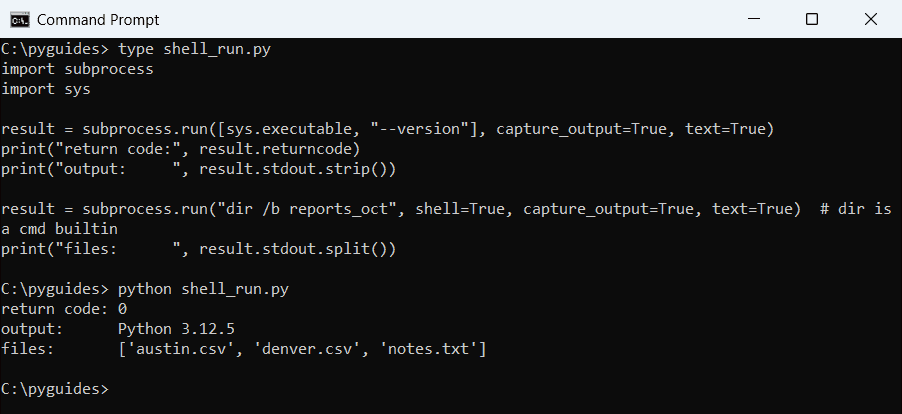 returncode 0 means success. stdout holds whatever the command printed.
Using sys.executable runs the same Python as your script, which avoids PATH surprises. On macOS or Linux, you’d use ["ls", "reports_oct"] instead of dir.
Handling shell command errors and timeouts
By default, a failing command doesn’t raise anything; you have to check the return code. check=True turns failures into exceptions, and timeout= stops commands that hang:
import subprocess import sys try: subprocess.run([sys.executable, "-c", "import sys; sys.exit(3)"], check=True) except subprocess.CalledProcessError as err: print("CalledProcessError: exit code", err.returncode) try: subprocess.run([sys.executable, "-c", "import time; time.sleep(5)"], timeout=1) except subprocess.TimeoutExpired as err: print("TimeoutExpired after", err.timeout, "second") try: subprocess.run(["no-such-program"]) except FileNotFoundError as err: print("FileNotFoundError:", err.strerror)Output:
CalledProcessError: exit code 3 TimeoutExpired after 1.0 second FileNotFoundError: The system cannot find the file specified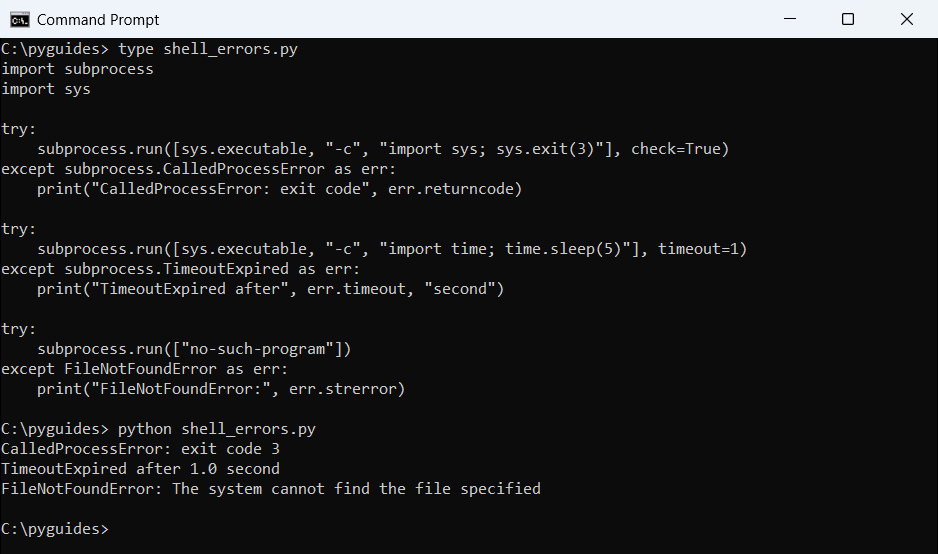 Three different failures, three different exceptions you can catch.
Catching these specifically keeps a script running when one command fails. For reading tracebacks from failures, see printing a stack trace in Python.
Sending input to a shell command and reading stderr
input= sends text to the command’s standard input. Errors usually go to stderr, which capture_output=True keeps separate from normal output:
import subprocess import sys script = "import sys; data = sys.stdin.read().split(); print(sum(float(x) for x in data))" result = subprocess.run([sys.executable, "-c", script], input="19.99 4.50 102.00", capture_output=True, text=True) print("child process says total =", result.stdout.strip()) r = subprocess.run([sys.executable, "-c", "import sys; print('oops', file=sys.stderr)"], capture_output=True, text=True) print("stdout:", repr(r.stdout), "| stderr:", repr(r.stderr.strip()))Output:
child process says total = 126.49 stdout: '' | stderr: 'oops'How do you see output while a command is running?
run() waits until the command finishes. For long jobs, subprocess.Popen lets you read each line as it’s printed:
import subprocess import sys child = [sys.executable, "-u", "-c", "import time\nfor i in range(1, 4):\n print(f'step {i} of 3', flush=True)\n time.sleep(0.4)"] with subprocess.Popen(child, stdout=subprocess.PIPE, text=True) as proc: for line in proc.stdout: # read output as it arrives print("got:", line.strip()) print("exit code:", proc.returncode)Output:
got: step 1 of 3 got: step 2 of 3 got: step 3 of 3 exit code: 0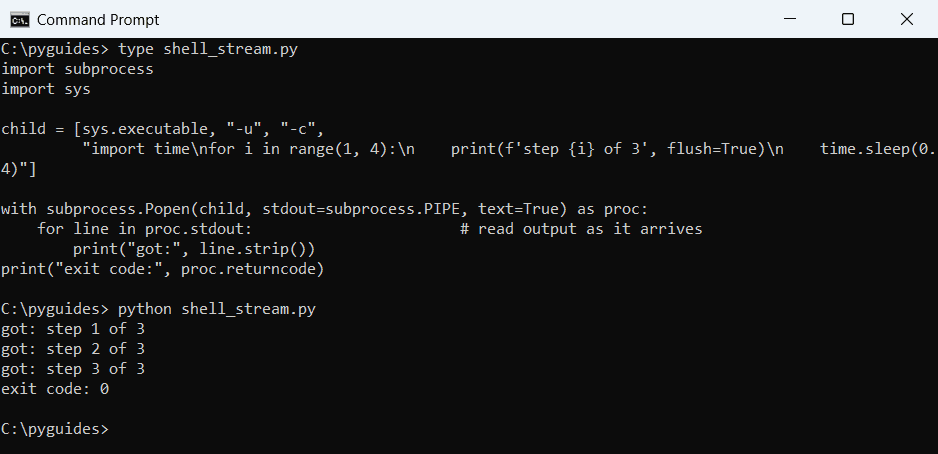 Each step appears as soon as the child prints it, not all at once at the end.
Is shell=True safe?
Only with text you control. With shell=True, characters like &, | and ; run extra commands, so user input can hijack it. That’s called shell injection:
import shlex import subprocess import sys user_input = "report.csv & echo HACKED" # unsafe: the shell treats & as "run another command" subprocess.run(f"echo Processing {user_input}", shell=True) # safe: a list of arguments, no shell; & is just part of one argument subprocess.run([sys.executable, "-c", "import sys; print('Processing', sys.argv[1])", user_input]) print("POSIX-quoted for bash:", shlex.quote(user_input))Output:
Processing report.csv HACKED Processing report.csv & echo HACKED POSIX-quoted for bash: 'report.csv & echo HACKED'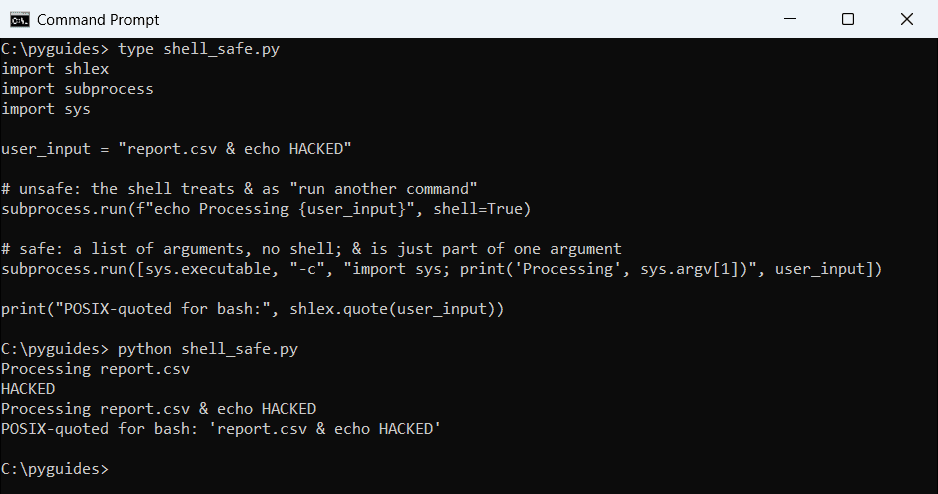 The first call ran a second command. The list form printed the input as plain text.
I always prefer a list of arguments without shell=True. If you must build a bash command string, quote each piece with shlex.quote().
os.system vs subprocess
os.system() runs a command through the shell and returns its exit code, but you can’t capture the output. It’s fine for quick scripts, but I use subprocess for anything real:
import os code = os.system("echo Hello from os.system") # output goes straight to the console print("returned:", code)Output:
Hello from os.system returned: 0| Capture output | No | Yes (capture_output=True) |
| Error handling | Check the return value | check=True raises exceptions |
| Timeouts | No | Yes (timeout=) |
| Avoids the shell | No | Yes, with a list of arguments |
For clearing the terminal with a shell command, see how to clear the screen in Python.
Related scripting guides:
- How to run a Python script
- Change the working directory in Python
- Environment variables in Python
- os.path.join() in Python
Frequently asked questions
How do I run a shell command in Python?
Use subprocess.run(["command", "arg"], capture_output=True, text=True) and read result.stdout.
How do I get the output of a command as a string?
Pass capture_output=True, text=True, then use result.stdout. Or call subprocess.check_output(..., text=True).
When do I need shell=True?
For shell features like pipes, wildcards, or Windows builtins such as dir and echo. Avoid it with untrusted input.
How do I run a bash command from Python?
On macOS or Linux, use a list like ["ls", "-l"], or ["bash", "-c", "your command"] for shell syntax.
How do I stop a command that takes too long?
Pass timeout=seconds to subprocess.run() and catch subprocess.TimeoutExpired.
Where is subprocess documented?
See subprocess in the Python docs, including its security notes.







 English (US)