
 3 weeks ago
46
Club.noww.in
Range and xrange in Python come from two eras: in Python 2, range() built a full list while xrange() produced numbers lazily. Python 3 dropped xrange and made range work the lazy way, so today you just use range():
# Python 3 for i in range(1_000_000): # lazy and memory-light, like the old xrange ...Python 2 reached end of life in 2020, so I describe its behavior rather than run it. Every Python 3 example ran on Python 3.12.5 in Command Prompt.
I’ll show the NameError you get from old code, how much memory range saves, what a Python 3 range can do, how fast membership checks are, and how to port xrange code.
range vs xrange: what’s the difference?
| Returns | A list | An xrange object | A range object |
| Memory | Grows with size | Small and fixed | Small and fixed |
| Indexing, len() | Yes | Yes | Yes |
| Slicing | Yes (list) | No | Yes (returns a range) |
| Exists in Python 3 | Renamed behavior | No (NameError) | Yes |
In short, Python 3’s range is the old xrange with extra features, and the list-building version is gone. Wrap it in list() when you actually need a list.
Why does xrange give a NameError in Python 3?
Because it no longer exists. Old tutorials and Python 2 code still use it, and Python 3 stops at the first call:
try: for i in xrange(3): print(i) except NameError as err: print("NameError:", err) for i in range(3): # in Python 3, range does xrange's job print(i, end=" ") print() print(type(range(3)))Output:
NameError: name 'xrange' is not defined 0 1 2 <class 'range'>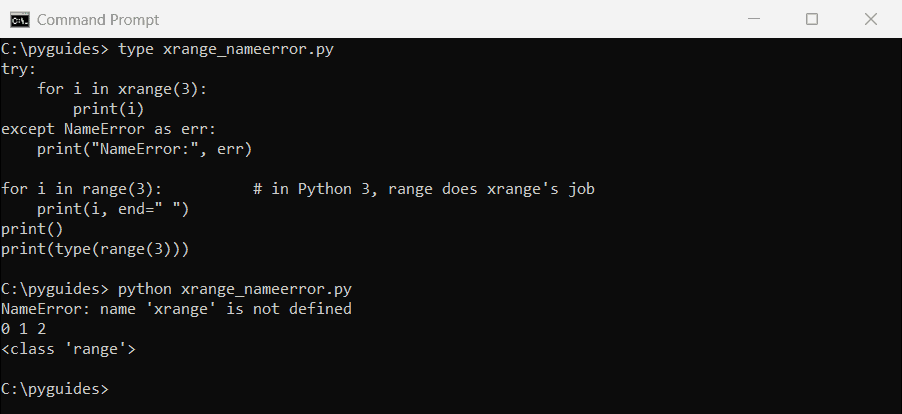 Swap xrange for range and the loop runs. type() shows it’s a range object, not a list.
For more on loops over ranges, see for i in range in Python, and for counting down, reversing a range.
Memory: range stays tiny, lists don’t
A range only stores start, stop and step, so its size never changes. A list stores every number:
import sys for n in (10, 1_000, 10_000_000): r = range(n) print(f"n = {n:>10,}: range {sys.getsizeof(r)} bytes | list {sys.getsizeof(list(r)):>11,} bytes")Output:
n = 10: range 48 bytes | list 136 bytes n = 1,000: range 48 bytes | list 8,056 bytes n = 10,000,000: range 48 bytes | list 80,000,056 bytes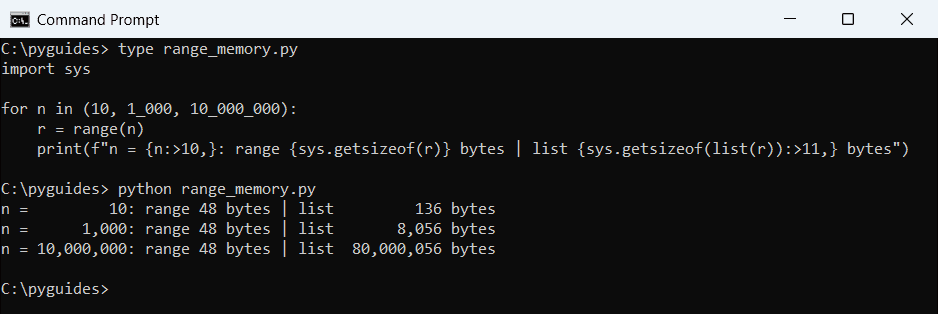 48 bytes for a range of any size, versus about 80 MB for a list of ten million numbers.
That’s exactly the saving xrange gave you in Python 2, and it’s why looping over range(10_000_000) doesn’t eat your RAM.
What a Python 3 range can do
Python 3’s range is more than a lazy counter. It supports len(), indexing, slicing, in, index() and count(), all computed with arithmetic instead of stored values:
r = range(0, 1_000_000_000, 5) # a billion-wide range, created instantly print(len(r)) # 200,000,000 numbers, computed not stored print(r[3], r[-1]) # indexing works print(r[10:15]) # slicing gives another range print(999_999_995 in r) # membership is O(1) for integers print(r.index(500), r.count(7)) print(list(reversed(range(5)))) print(range(0, 10, 2) == range(0, 9, 2)) # compared by the numbers they produceOutput:
200000000 15 999999995 range(50, 75, 5) True 100 0 [4, 3, 2, 1, 0] True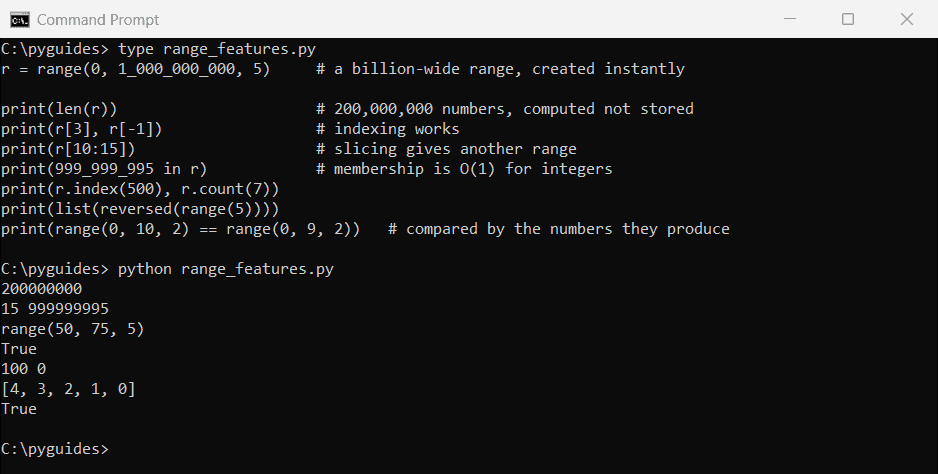 A range of a billion numbers answers all of these instantly, because nothing is stored.
Is checking x in range fast?
For integers, yes: in on a range is a quick calculation, while in on a list scans item by item:
import timeit n = 10_000_000 t_range = timeit.timeit(lambda: (n - 1) in range(n), number=1_000) numbers = list(range(n)) # build the list once t_list = timeit.timeit(lambda: (n - 1) in numbers, number=20) / 20 * 1_000 print(f"x in range(n): {t_range * 1000:.3f} ms for 1,000 checks") print(f"x in list: {t_list:.0f} s for 1,000 checks (from 20 timed)")Output:
x in range(n): 0.113 ms for 1,000 checks x in list: 59 s for 1,000 checks (from 20 timed)So don’t convert a range to a list just to test membership. For more on membership tests, see what in means in Python.
Porting xrange code to Python 3
The fix is almost always a plain search-and-replace of xrange( with range(. If one file has to run on both versions, alias it once:
try: xrange # Python 2 except NameError: xrange = range # Python 3: alias it total = 0 for i in xrange(1, 101): total += i print("sum 1..100 =", total) print("list when you need one:", list(range(5)))Output:
sum 1..100 = 5050 list when you need one: [0, 1, 2, 3, 4]The old 2to3 tool that automated this was removed in Python 3.13, so do it by hand or with a modern linter. Python 3 vs Python 2 lists the other big differences.
Related guides on loops and Python versions:
- Python for loop
- What does enumerate do in Python
- Install multiple Python versions
- len() function in Python
Frequently asked questions
What is the difference between range and xrange in Python?
In Python 2, range() returned a list and xrange() returned a lazy object. Python 3 removed xrange and made range lazy.
Does xrange exist in Python 3?
No. Using it raises NameError: name 'xrange' is not defined. Use range().
Is Python 3 range a generator?
No. It’s a sequence type: it supports len(), indexing and slicing, and you can loop over it more than once.
How do I get a list from range in Python 3?
Wrap it: list(range(10)).
Is range slower than xrange was?
No. Python 3’s range is as memory-efficient as xrange and adds fast membership tests and slicing.
Where is range documented?
See range in the Python docs.







 English (US)