
 1 week ago
31
Club.noww.in
Here’s how to update Python in the terminal: on Windows, run py install --update with the Python install manager (or winget upgrade Python.Python.3.14); on a Mac, run brew upgrade python@3.14; on Linux, install the newer version alongside the system one. Then check it:
python --version py install --update # Windows, Python install manager brew upgrade python@3.14 # macOS with HomebrewThe newest release on python.org in October 2026 is Python 3.14.8. The screenshots are real Command Prompt runs on Windows 11, where my main setup is Python 3.12.5.
I’ll show how to check what you have, the Windows, Mac and Linux update commands, why minor versions install side by side, and what to do with virtual environments and pip afterward.
Step 1: Check your current Python version
Start by seeing what’s installed. python --version shows the default, and on Windows py --list shows every version the launcher knows about:
python --version py --listOutput:
Python 3.12.5 -V:3.12 * Python 3.12 (64-bit)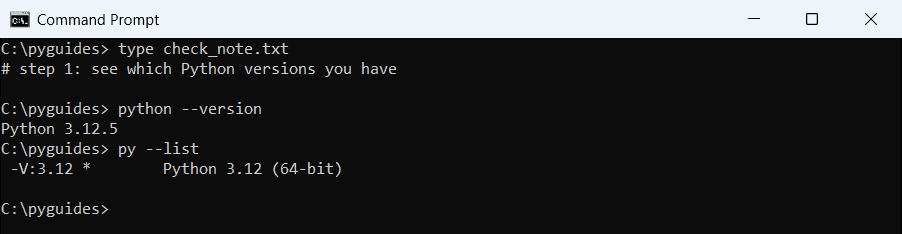 The asterisk marks the default version that py runs.
A patch update (3.14.7 to 3.14.8) replaces the old one. A minor update (3.13 to 3.14) installs next to it, so both stay available.
How to update Python on Windows
Python’s Windows docs now recommend the Python install manager, which provides the py, python and pymanager commands. The older full installer and launcher are marked deprecated:
py list # installed runtimes py install 3.14 # add Python 3.14 py install --update # update every managed install to its newest releaseYou can also use winget, Windows’ built-in package manager. Searching shows each Python version as its own package, plus the install manager itself:
winget search --id Python.Python --source winget --accept-source-agreementsOutput:
Name Id Version ----------------------------------------------------------------------------- Python 2 Python.Python.2 2.7.18150 Python 3.0 Python.Python.3.0 3.0.1 Python 3.1 Python.Python.3.1 3.1.4 Python 3.10 Python.Python.3.10 3.10.11 Python 3.11 Python.Python.3.11 3.11.9 Python 3.12 Python.Python.3.12 3.12.10 Python 3.13 Python.Python.3.13 3.13.15 Python 3.14 Python.Python.3.14 3.14.7 Python 3.2 Python.Python.3.2 3.2.5 Python 3.3 Python.Python.3.3 3.3.5 Python 3.4 Python.Python.3.4 3.4.4 Python 3.5 Python.Python.3.5 3.5.4 Python 3.6 Python.Python.3.6 3.6.8 Python 3.7 Python.Python.3.7 3.7.9 Python 3.8 Python.Python.3.8 3.8.10 Python 3.9 Python.Python.3.9 3.9.13 Python Embeddable Package 3.14 Python.PythonEmbeddablePackage.3.14 3.14.6 Python Install Manager Python.PythonInstallManager 26.3.240.0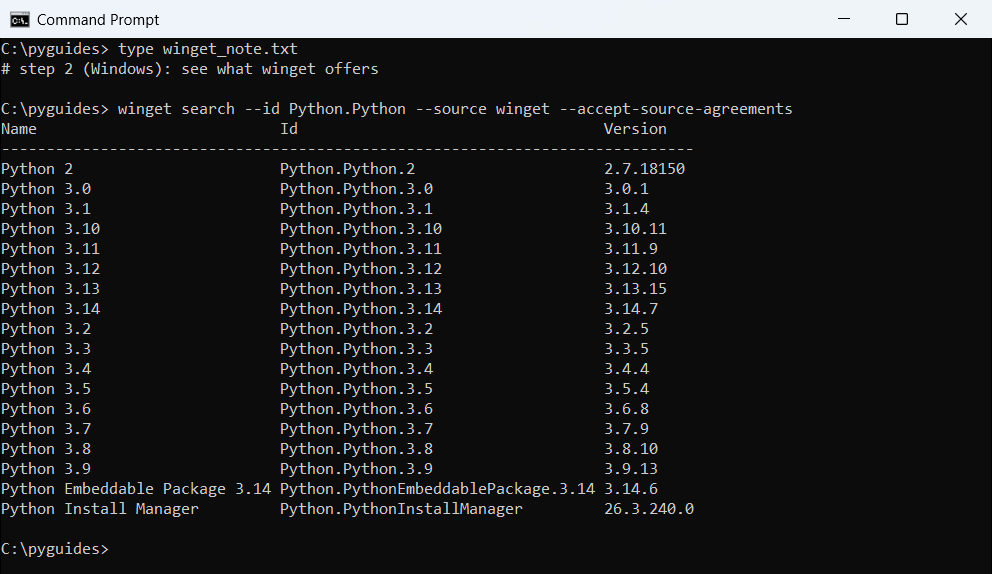 winget lists each minor version separately. Its package versions can lag python.org by a few days.
How to update Python on macOS and Linux
With Homebrew on a Mac, upgrade the formula you use, or install a new one for a new minor version:
brew update brew upgrade python@3.14 brew install python@3.15 # once 3.15 is releasedOn Linux, the system python3 belongs to your distribution, so don’t replace it. Install a newer version next to it with the deadsnakes PPA on Ubuntu or with uv. The steps are in installing Python on Ubuntu and installing Python on Mac.
How to update Python with uv on any system
uv installs Python versions into your user folder, with no admin rights, and keeps several side by side:
uv python install 3.14 # newest 3.14.x uv python upgrade 3.14 # move to the latest patch uv python list # what's available and installedIt’s my favorite way to juggle versions across projects. See installing multiple Python versions for more.
What happens to virtual environments when you update Python?
A virtual environment is tied to the Python that created it. After a minor upgrade, old venvs keep using the old version, so recreate them with the new one. pip inside each venv updates separately:
import sys print("this venv runs Python", sys.version.split()[0])Output:
this venv runs Python 3.12.5 pip 26.2.1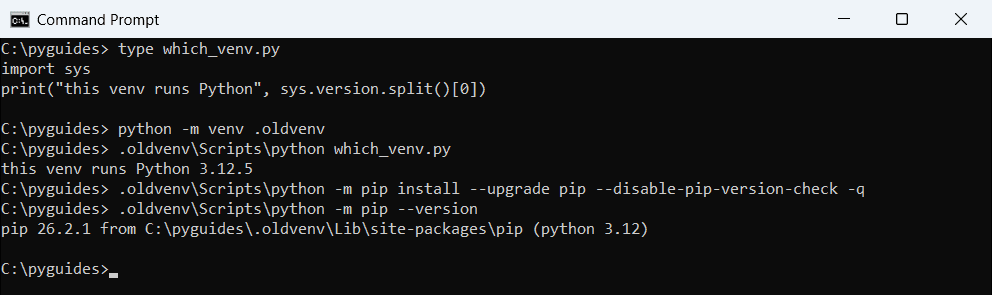 The venv reports the version it was built with, and pip is upgraded inside that venv only.
Keeping a requirements.txt makes rebuilding painless; see pip install -r requirements.txt.
Update commands at a glance
| Windows (install manager) | py install --update |
| Windows (winget) | winget upgrade Python.Python.3.14 |
| macOS (Homebrew) | brew upgrade python@3.14 |
| Ubuntu | deadsnakes PPA or uv; leave the system python3 alone |
| Any OS (uv) | uv python upgrade 3.14 |
| pip itself | python -m pip install --upgrade pip |
More Python setup guides:
- How to run a Python script
- How to install a module in Python
- What is the Python interpreter
- Python virtual environments
Frequently asked questions
How do I update Python from the terminal?
On Windows use py install --update or winget upgrade Python.Python.3.14; on macOS use brew upgrade python@3.14; on Linux install a newer version alongside the system one.
Does updating Python delete my old version?
A patch update replaces it. A new minor version (like 3.13 to 3.14) installs next to the old one.
Do I need to reinstall my packages after updating?
For a new minor version, yes. Recreate your virtual environments and reinstall from requirements.txt.
How do I check if Python updated?
Open a new terminal and run python --version (or py --list on Windows).
Can I update the Python that comes with Ubuntu or macOS?
Leave system Python alone. Install your own version with deadsnakes, Homebrew, uv or python.org instead.
Where are the Windows install manager docs?
See Using Python on Windows in the Python docs.






 English (US)