
 2 weeks ago
35
Club.noww.in
Here’s how to install a module in Python: run python -m pip install followed by the package name, ideally inside a virtual environment. Then import it in your code:
python -m pip install humanize # Windows: py -m pip install humanize python3 -m pip install humanize # macOS / LinuxI ran every command below in a fresh virtual environment with Python 3.12.5 on Windows, so the output is exactly what pip printed.
We’ll go from a ModuleNotFoundError to a working import, then check, upgrade, pin and remove modules, and sort out the package-name versus import-name trap.
How to install a module in Python with pip
Here’s the usual sequence: the script fails because the module isn’t installed, you install it with pip, and the same script works:
import humanize print(humanize.intcomma(1250500)) print(humanize.naturalsize(52_428_800)) print(humanize.ordinal(3), "place")Output:
Traceback (most recent call last): File "C:\pyguides\use_humanize.py", line 1, in <module> import humanize ModuleNotFoundError: No module named 'humanize' Collecting humanize Using cached humanize-4.16.0-py3-none-any.whl.metadata (8.0 kB) Using cached humanize-4.16.0-py3-none-any.whl (137 kB) Installing collected packages: humanize Successfully installed humanize-4.16.0 1,250,500 52.4 MB 3rd place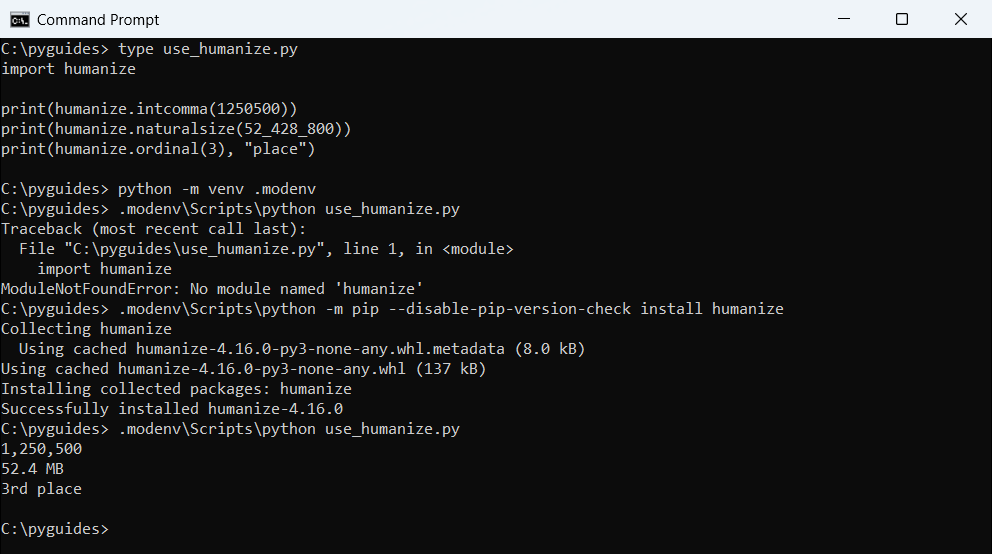 Before the install: ModuleNotFoundError. After: the script prints formatted numbers.
python -m pip runs pip for that exact Python, so the module lands where your script will look. Plain pip can belong to a different Python on your PATH, which is the most common reason an install “didn’t work”.
If you still see the error after installing, ModuleNotFoundError after pip install walks through every cause.
Why install modules in a virtual environment?
A virtual environment is a private folder of packages for one project, so projects can’t break each other with different versions. Creating one is a single command:
python -m venv .venv .venv\Scripts\activate # Windows source .venv/bin/activate # macOS / Linux python -m pip install humanizeOn recent Ubuntu, Debian and Homebrew Python, pip refuses to install into the system Python at all, so a venv isn’t optional there. See Python virtual environments.
Checking, pinning and upgrading installed modules
pip show describes one package, pip list shows everything installed, and you can install an exact version or upgrade to the latest:
.modenv\Scripts\python -m pip --disable-pip-version-check show humanize .modenv\Scripts\python -m pip --disable-pip-version-check list .modenv\Scripts\python -m pip --disable-pip-version-check install humanize==4.9.0 .modenv\Scripts\python -m pip --disable-pip-version-check install --upgrade humanizeOutput:
Name: humanize Version: 4.16.0 Summary: Python humanize utilities Home-page: https://github.com/python-humanize/humanize Author: Author-email: Jason Moiron <jmoiron@jmoiron.net> License: Location: C:\pyguides\.modenv\Lib\site-packages Requires: Required-by: Package Version -------- ------- humanize 4.16.0 pip 24.2 Collecting humanize==4.9.0 Using cached humanize-4.9.0-py3-none-any.whl.metadata (7.9 kB) Using cached humanize-4.9.0-py3-none-any.whl (126 kB) Installing collected packages: humanize Attempting uninstall: humanize Found existing installation: humanize 4.16.0 Uninstalling humanize-4.16.0: Successfully uninstalled humanize-4.16.0 Successfully installed humanize-4.9.0 Requirement already satisfied: humanize in c:\pyguides\.modenv\lib\site-packages (4.9.0) Collecting humanize Using cached humanize-4.16.0-py3-none-any.whl.metadata (8.0 kB) Using cached humanize-4.16.0-py3-none-any.whl (137 kB) Installing collected packages: humanize Attempting uninstall: humanize Found existing installation: humanize 4.9.0 Uninstalling humanize-4.9.0: Successfully uninstalled humanize-4.9.0 Successfully installed humanize-4.16.0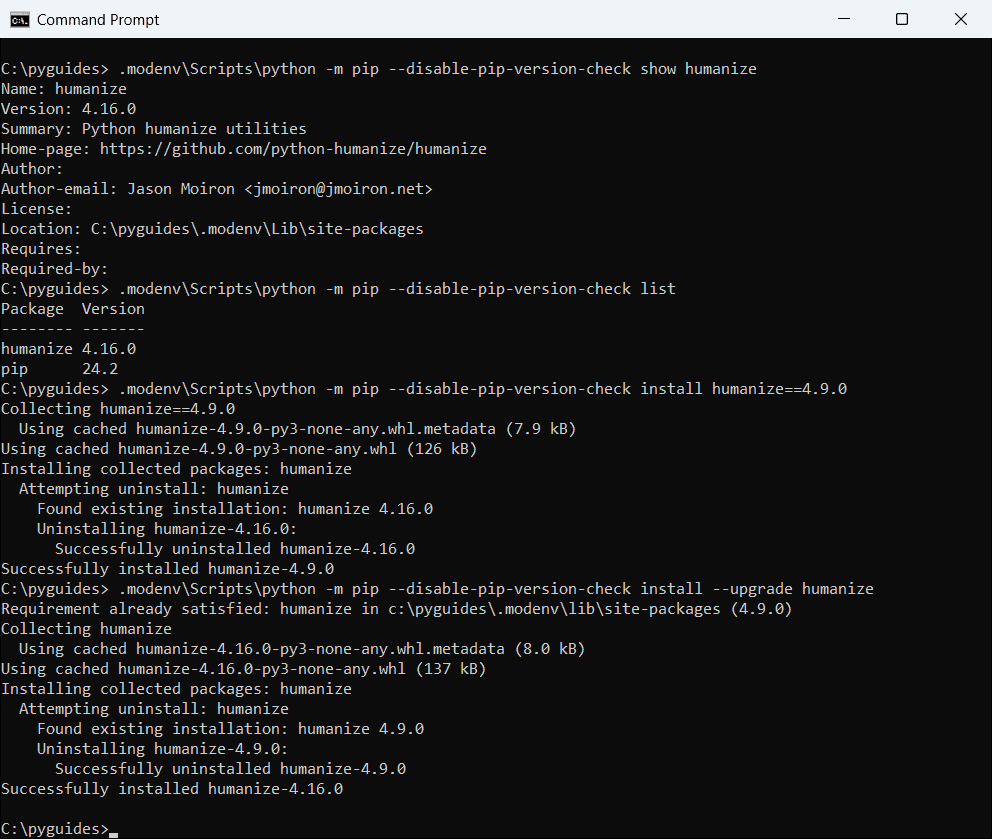 pip replaced the newer version with 4.9.0 when asked, then upgraded back to the latest.
For reproducible projects, list your modules in a file and install them together; see pip install -r requirements.txt and pip install a specific version.
Why does pip install fail for some module names?
The name you import isn’t always the name you install. Pillow is imported as PIL, but pip install PIL fails because no such package exists:
from PIL import Image # installed as "Pillow", imported as "PIL" img = Image.new("RGB", (120, 60), "navy") print("Pillow works, image size:", img.size)Output:
ERROR: Could not find a version that satisfies the requirement PIL (from versions: none) ERROR: No matching distribution found for PIL Collecting Pillow Using cached pillow-12.3.0-cp312-cp312-win_amd64.whl.metadata (9.3 kB) Using cached pillow-12.3.0-cp312-cp312-win_amd64.whl (7.2 MB) Installing collected packages: Pillow Successfully installed Pillow-12.3.0 Pillow works, image size: (120, 60)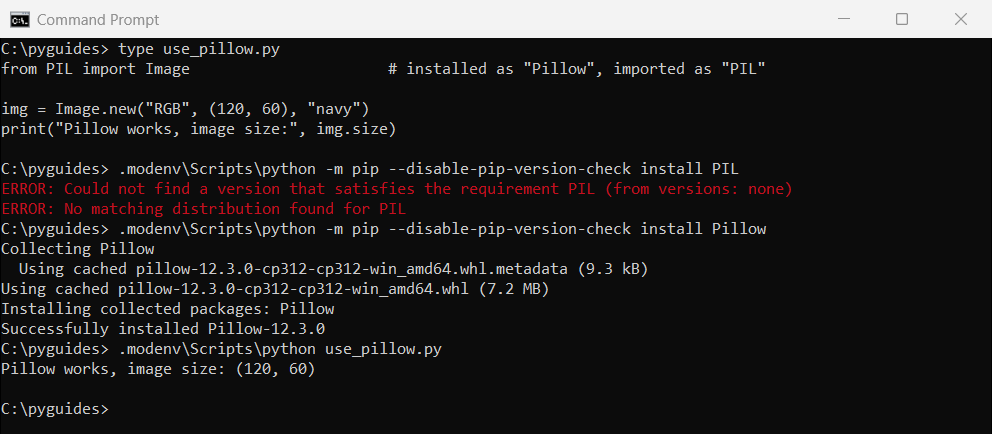 Install “Pillow”, import “PIL”. The error tells you there’s no PIL package on PyPI.
| PIL | Pillow |
| bs4 | beautifulsoup4 |
| cv2 | opencv-python |
| sklearn | scikit-learn |
| yaml | PyYAML |
| dotenv | python-dotenv |
When in doubt, search the module on pypi.org; the install command is at the top of each project page.
Uninstalling a module
pip uninstall removes a package; -y skips the confirmation prompt. Importing it afterward fails again, which confirms it’s gone:
.modenv\Scripts\python -m pip --disable-pip-version-check uninstall -y humanize .modenv\Scripts\python -c "import humanize"Output:
Found existing installation: humanize 4.16.0 Uninstalling humanize-4.16.0: Successfully uninstalled humanize-4.16.0 Traceback (most recent call last): File "<string>", line 1, in <module> ModuleNotFoundError: No module named 'humanize'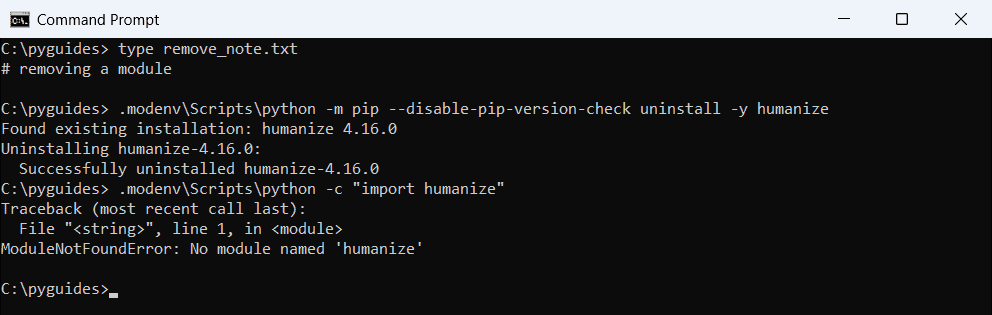 Uninstalled, then the import fails, as expected.
uv, a newer tool, does the same jobs much faster with uv pip install and uv add. Many of my projects use it now; the commands map almost one to one.
pip commands cheat sheet
| Install | python -m pip install requests |
| Install a version | python -m pip install requests==2.32.3 |
| Upgrade | python -m pip install --upgrade requests |
| Uninstall | python -m pip uninstall requests |
| Show details | python -m pip show requests |
| List installed | python -m pip list |
| Check conflicts | python -m pip check |
Related setup guides you may need:
- How to run a Python script
- numpy.core.multiarray failed to import
- Import from another directory
- Install Python on Mac
Frequently asked questions
How do I install a module in Python?
Run python -m pip install module-name in a terminal, preferably inside an activated virtual environment, then import it in your code.
Why do I still get ModuleNotFoundError after pip install?
pip installed it into a different Python. Use python -m pip install with the same python that runs your script.
What’s the difference between pip and python -m pip?
python -m pip guarantees pip runs for that interpreter. Plain pip may point at another Python on your PATH.
How do I install a module in VS Code?
Select your interpreter or venv in VS Code, open its terminal, and run python -m pip install module-name there.
Can I install modules without internet?
Yes, from downloaded wheel files: python -m pip install path/to/package.whl.
Where is the official guide?
See Installing Python Modules in the Python docs.







 English (US)