
 1 month ago
48
Club.noww.in
Environment variables in Python live in os.environ, a dictionary-like object. Read a required one with os.environ["NAME"], an optional one with os.getenv("NAME", default), and check for one with "NAME" in os.environ:
import os region = os.environ["STORE_REGION"] # KeyError if it's missing retries = os.getenv("MAX_RETRIES", "3") # "3" if it's missing has_debug = "DEBUG" in os.environ # True or FalseEvery screenshot here is from the Windows Command Prompt running Python 3.12.5 with python-dotenv 1.2.4, and every variable is one I created for the demo.
You’ll see how to read, check and set them, why their values are always strings, how to load a .env file, and how to set one in each kind of terminal.
How to read an environment variable in Python
Here the terminal sets two variables and then runs the script. Both lines are on one command in Command Prompt, so the variables exist when Python starts:
import os region = os.environ["STORE_REGION"] # required: stops with KeyError if missing retries = os.getenv("MAX_RETRIES", "3") # optional, with a default print("region :", repr(region)) print("retries:", repr(retries)) print("DEBUG set?", "DEBUG" in os.environ)Command Prompt output:
region : 'us-east' retries: '5' DEBUG set? False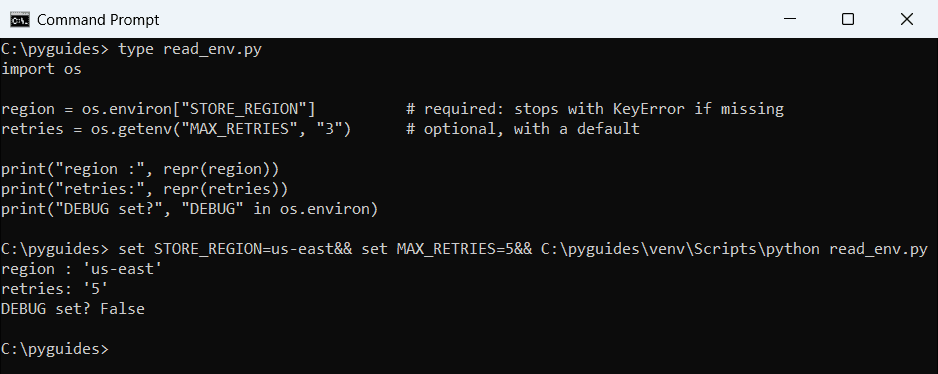 os.environ for the required value, os.getenv() with a default for the optional one.
Notice '5' came back in quotes: it’s a string, not a number. More on that shortly.
Which one should you use? os.environ["NAME"] when the program can’t work without the value, so it fails loudly at startup. os.getenv() when there’s a sensible default.
How do you check if an environment variable exists in Python?
A missing variable raises KeyError with square brackets and returns None with os.getenv(). To test without reading, use in:
import os try: url = os.environ["SHIPPING_API_URL"] except KeyError as err: print("KeyError:", err) print("getenv, no default :", os.getenv("SHIPPING_API_URL")) print("getenv, default :", os.getenv("SHIPPING_API_URL", "https://api.example.com")) print("'SHIPPING_API_URL' in os.environ:", "SHIPPING_API_URL" in os.environ)Output:
KeyError: 'SHIPPING_API_URL' getenv, no default : None getenv, default : https://api.example.com 'SHIPPING_API_URL' in os.environ: FalseKeep in mind that an empty variable still exists. If NAME= is set to nothing, "NAME" in os.environ is True and its value is "", so check both when it matters.
Environment variable values are always strings
This catches almost everyone once. Every value is text, so "false" is a non-empty string, and a non-empty string is truthy:
import os os.environ["DEBUG"] = "false" os.environ["MAX_RETRIES"] = "5" print("bool(DEBUG) :", bool(os.environ["DEBUG"])) # True! debug = os.environ["DEBUG"].strip().lower() in ("1", "true", "yes", "on") print("parsed DEBUG :", debug) print("MAX_RETRIES + '1' :", os.environ["MAX_RETRIES"] + "1") # string joining print("int(MAX_RETRIES)+1 :", int(os.environ["MAX_RETRIES"]) + 1) try: os.environ["PORT"] = 8080 except TypeError as err: print("TypeError:", err)Output:
bool(DEBUG) : True parsed DEBUG : False MAX_RETRIES + '1' : 51 int(MAX_RETRIES)+1 : 6 TypeError: str expected, not int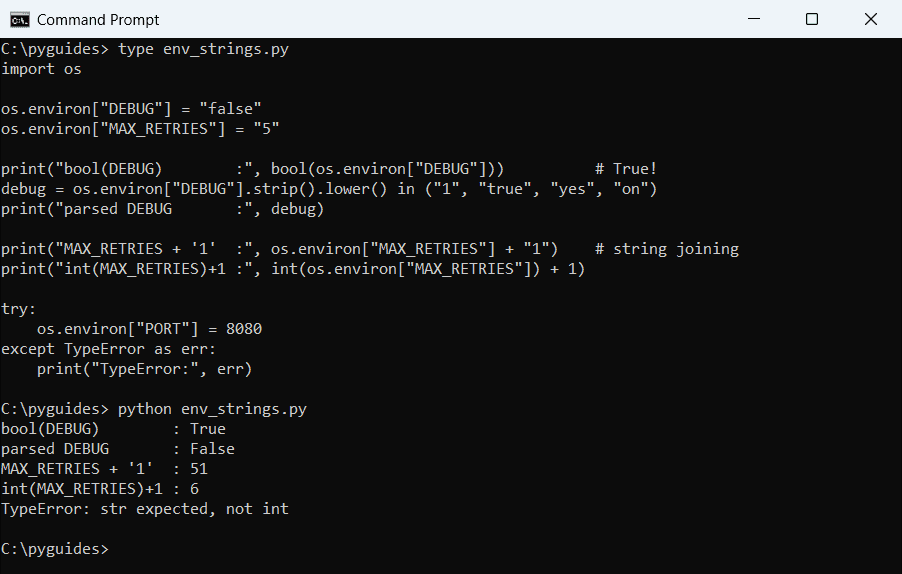 bool("false") is True, "5" + "1" is "51", and assigning an int raises TypeError.
Convert values yourself as you read them: int() for numbers, and an explicit list of accepted words for true/false flags. When setting values from Python, pass strings, as in os.environ["PORT"] = str(8080).
How to set an environment variable from Python
Assigning to os.environ changes the variable for your running script and any programs it starts. It doesn’t change the terminal that launched it:
import os import subprocess import sys os.environ["STORE_REGION"] = "us-west" # this process and its children only child = subprocess.run( [sys.executable, "-c", "import os; print(os.environ['STORE_REGION'])"], capture_output=True, text=True, ) print("this script sees :", os.environ["STORE_REGION"]) print("a child sees :", child.stdout.strip())Command Prompt output:
this script sees : us-west a child sees : us-west after the script, the shell sees: %STORE_REGION%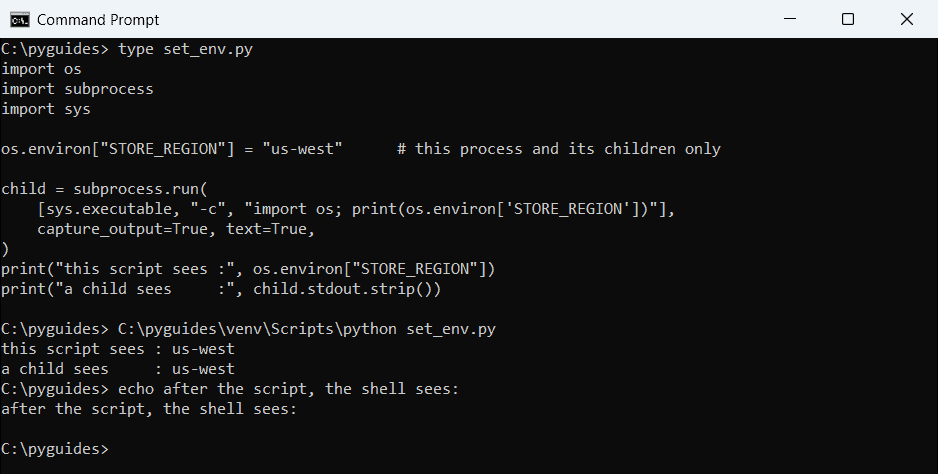 The child process saw us-west. Back in Command Prompt, %STORE_REGION% isn’t set at all, so it prints literally.
That’s by design: a program can’t reach back and change its parent’s environment. To set a variable for good, set it in the shell or the operating system, as the table below shows.
Loading environment variables from a .env file
Typing variables before every run gets old fast. Most projects keep them in a .env file and load it with python-dotenv (python -m pip install python-dotenv):
STORE_REGION=us-east MAX_RETRIES=5 DEBUG=false import os from dotenv import load_dotenv loaded = load_dotenv() # reads .env into os.environ print(".env found:", loaded) for name in ("STORE_REGION", "MAX_RETRIES", "DEBUG"): print(f"{name:13}= {os.getenv(name)}")Output:
.env found: True STORE_REGION = us-east MAX_RETRIES = 5 DEBUG = false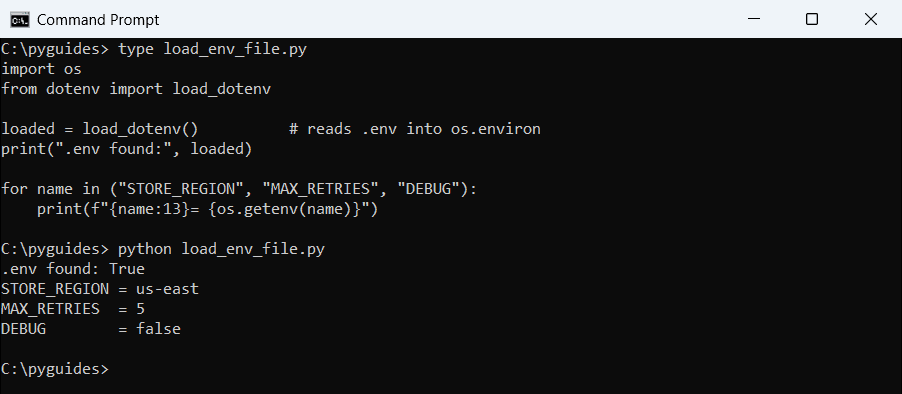 load_dotenv() found the file and copied its values into os.environ.
By default, load_dotenv() doesn’t overwrite variables that are already set, so real environment settings on a server win over the file. Pass override=True if you want the opposite.
Add .env to your .gitignore; it often holds API keys and passwords. If from dotenv import load_dotenv fails, see ModuleNotFoundError after pip install.
How to set environment variables on Windows, macOS and Linux
| Command Prompt | set STORE_REGION=us-east | setx STORE_REGION us-east (new windows only) |
| PowerShell | $env:STORE_REGION = "us-east" | System Properties, Environment Variables |
| macOS / Linux (bash, zsh) | export STORE_REGION=us-east | Add the export line to ~/.zshrc or ~/.bashrc |
| One command only | STORE_REGION=us-east python app.py (macOS / Linux) | Not applicable |
In Command Prompt, don’t put a space before && when you chain commands, or the space becomes part of the value. That’s why the demo above writes set STORE_REGION=us-east&&.
VS Code, PyCharm and Jupyter each read variables when they start, so restart them after changing a permanent variable. For Django settings, printing environment variables in Django shows a framework-specific approach.
Python environment variables: quick reference
| Read, required | os.environ["NAME"] |
| Read, with a default | os.getenv("NAME", "default") |
| Check it exists | "NAME" in os.environ |
| Read a number | int(os.getenv("MAX_RETRIES", "3")) |
| Read a true/false flag | os.getenv("DEBUG", "").lower() in ("1", "true", "yes") |
| Set for this script | os.environ["NAME"] = "value" |
| Remove | os.environ.pop("NAME", None) |
| Load a .env file | from dotenv import load_dotenv; load_dotenv() |
Setting up a Python project? These guides fit alongside this one:
- Virtual environments in Python
- pip install a specific version of a package
- ModuleNotFoundError after pip install
- Print environment variables in Django
- Check the type of a variable in Python
Frequently asked questions
How do I get an environment variable in Python?
Use os.environ["NAME"], which raises KeyError if it’s missing, or os.getenv("NAME", default), which returns the default instead.
How do I check if an environment variable exists in Python?
Use "NAME" in os.environ. It returns True even when the variable is set to an empty string.
What’s the difference between os.environ and os.getenv?
os.environ is the mapping of all variables; indexing it raises KeyError for a missing name. os.getenv() reads from it but returns None or your default instead.
Why is my environment variable ‘false’ treated as True?
Environment variables are strings, and any non-empty string is truthy. Compare the lowercased value against a list of words such as “true”, “1” and “yes”.
Does setting os.environ change the variable permanently?
No. It affects the running Python process and programs it starts. Set it in your shell profile or operating system to make it permanent.
How do I load a .env file in Python?
Install python-dotenv, then call load_dotenv() before reading os.environ. The os.environ documentation covers how the mapping itself behaves.







 English (US)